
XY AUDIO TO A PROJECTOR
Oscilloscope to Laser
The same stereo path that draws on a scope can drive galvos. Preview it in the browser, then choose live DAC output or an ILDA file.
Free to start · No credit card · Nothing to install
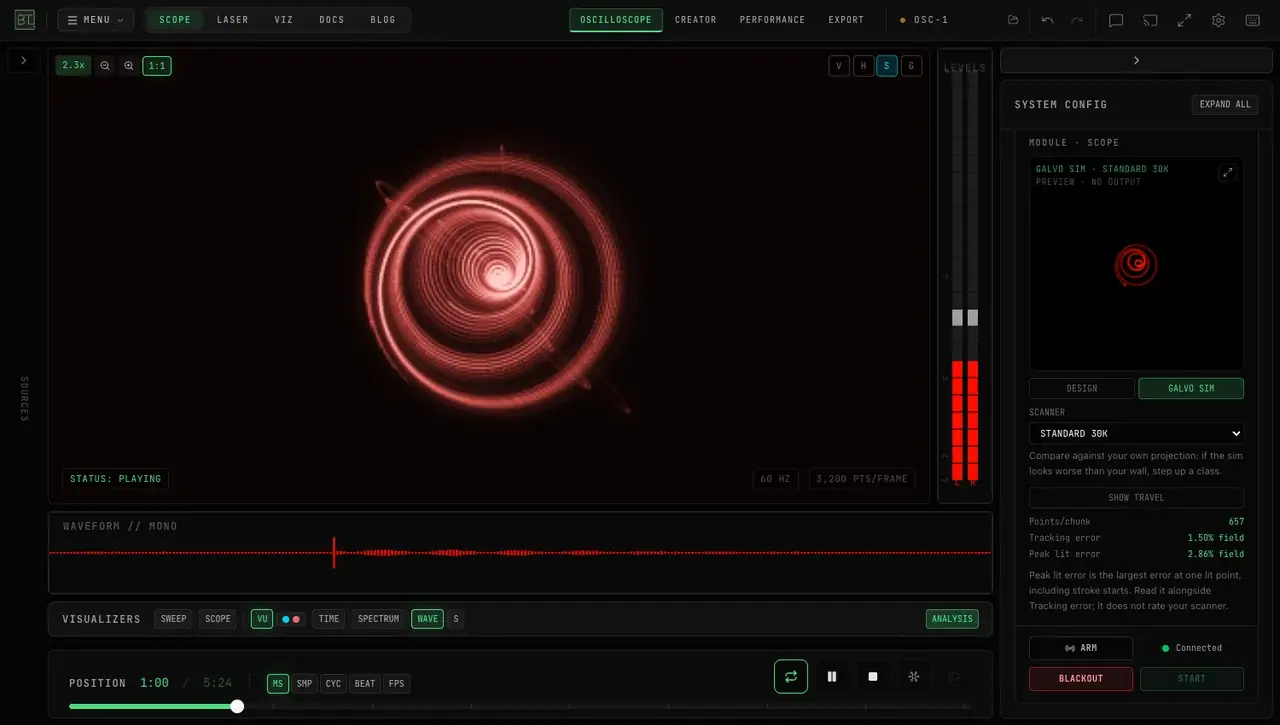
Oscilloscope to laser means sending the same XY drawing — left is X, right is Y — to a projector's scanners, not a sound-reactive party light. Open OSC-1 in BeamTracer, preview the figure, then stream a Helios in Chrome or Edge, use the macOS Bridge for Ether Dream or LaserCube, or export ILDA.
What does oscilloscope to laser mean?
An XY oscilloscope treats a stereo signal as coordinates: the left channel moves the beam horizontally, the right channel moves it vertically, and the shape you hear is the shape you see. Sending that path to a laser means the same two channels steer the projector's galvos. It is not a beat-reactive party fixture that washes the room when the kick hits.
If you are new to the medium, the oscilloscope music guide covers the drawing itself. This page is the jump from that drawing onto hardware.
How do you send oscilloscope music to a laser in BeamTracer?
Use the OSC-1 online oscilloscope in the browser. Preview the figure on the simulated scope, then choose a live DAC or an ILDA file. Creating and previewing start free; live hardware output is a Studio feature with trial sessions, listed on Pricing.
HOW TO DO IT
Open OSC-1
Go to OSC-1 in Chrome or Edge. Nothing to install. The free tier opens the scope, the synth, and the on-screen preview.
Give it an XY signal
Load a stereo oscilloscope-music file, use a live input, or play the built-in synthesizer. Left is X, right is Y — the audio is the drawing.
Preview on the simulated scope
Watch the figure on screen first. Open LASER OUTPUT, choose SIMULATOR, and press START. The simulator is free on every plan and does not use a hardware trial.
Stream or export
Connect HELIOS over USB, or use the macOS BeamTracer Bridge for Ether Dream and LaserCube. Or open EXPORT, choose the ILDA tab, and press EXPORT ILDA FRAME. For a full WAV sequence, use Animation Studio's Oscilloscope tool.
How do you connect a Helios in Chrome or Edge?
Helios talks to the browser over WebUSB. Plug the DAC in over USB, open OSC-1 in Chrome or Edge, open LASER OUTPUT, select HELIOS, and click CONNECT HELIOS. Choose the device in the browser's USB picker. No Bridge and no extra driver. WebUSB is Chrome and Edge only — see Laser DAC Output.
How do you use Ether Dream or LaserCube?
Those DACs sit on the local network, which a browser cannot reach alone. Install the free macOS BeamTracer Bridge, keep it running on the same Mac as the browser, then pick ETHER DREAM or LASERCUBE in LASER OUTPUT. Arm and START from the safety dock in the browser, not in the Bridge. Setup notes live in the Bridge guide.
When should you export ILDA instead of streaming live?
Export a file when you want a compatible player or another show program to take the frame. In OSC-1, open EXPORT, choose the ILDA tab, and press EXPORT ILDA FRAME — that writes the current XY frame as ILDA V5, not a full song. To turn a stereo XY WAV into an animation, use the Oscilloscope Music to ILDA recipe in Animation Studio. Continuous XY live output is an OSC-1 path; Animation Studio does not stream those converted XY layers to a DAC today.
Clean ILDA exports are three per calendar month below Studio, shared with BT Laser Studio, and unlimited on Studio. The remaining count appears in the ILDA tab.
What looks different on a laser than on a scope?
Laser mirrors have weight, so sharp corners round off, fine detail is smoothed to the scanner's point rate, and the beam must be blanked between shapes and never parked on one spot. See it side by side, with the simulated scanner and the safety behavior, in oscilloscope music on a laser projector.
Do you need a DC-coupled audio interface?
Not for this path. BeamTracer sends points digitally to Helios or through the Bridge. A DC-coupled interface is the usual requirement for a real CRT scope or a DIY audio-to-ILDA adaptor, because AC coupling strips the offset that positions the image. Headphone outputs have the same analog limitation — they are not how OSC-1 reaches a projector.
How does this compare with XYscope, dac_ilda, and OsciStudio?
Several good tools already solve pieces of this, and they are worth using when they match your rig.
XYscope is a Processing library that turns vectors into audio or laser output — a coding environment, not a browser instrument. dac_ilda is a DIY adaptor that converts analog audio into an ILDA signal, which is why people ask about DC-coupled interfaces and headphone outs. Vector Synthesis is a Pure Data toolkit for the same analog-drawing idea.
OsciStudio and LaserFromSound are desktop tools from oscilloscopemusic.com. OsciStudio is a stand-alone editor; LaserFromSound is a VST that sends a DAW's stereo output to Helios, Ether Dream, or WickedLaser. If your composition already lives in a DAW plugin host, that VST is a direct fit.
BeamTracer's difference is the browser path: preview on a simulated scope, stream Helios from Chrome or Edge, use the macOS Bridge for Ether Dream and LaserCube, or export ILDA — without installing a desktop editor for the OSC-1 half. It is not the only browser ILDA tool. LaserShowGen also offers a web editor. Compare the workflow you actually need — live XY, a plugin in a DAW, a Processing sketch, or a file for a player — and try yours before you commit.
FREQUENTLY ASKED QUESTIONS
Not for BeamTracer's laser path. OSC-1 sends points to the DAC over USB or the Bridge, not analog voltages out of a sound card. A DC-coupled interface matters when you drive a real CRT scope or a DIY audio-to-ILDA adaptor. For those analog paths, AC coupling drifts the picture back to center.
Hardware notes for a real CRT scopeNot to feed a laser from BeamTracer. Headphone outputs are analog and usually AC-coupled; OSC-1 does not send the projector through them. Use HELIOS over USB in Chrome or Edge, the macOS Bridge for Ether Dream or LaserCube, or an ILDA file. Headphone out is only relevant if you are driving a scope tube or a separate audio-to-ILDA adaptor.
Stream when you want the live XY signal on the wall — Helios in the same Chrome or Edge tab, or Ether Dream and LaserCube through the Bridge. EXPORT → ILDA → EXPORT ILDA FRAME writes the current frame for a compatible player. Animation Studio's Oscilloscope tool turns a stereo XY WAV into an ILDA animation. Live output is a Studio feature with three trial sessions; clean ILDA exports are three per month below Studio.
See current plan limitsUse Chrome or Edge for OSC-1 and for Helios. Helios uses WebUSB, which other browsers do not implement. Ether Dream and LaserCube need the macOS BeamTracer Bridge in addition to that browser. Firefox and Safari can view some pages, but they are not the laser-output path.
Browser supportCreating and previewing are free to start, with no card required. The DAC Simulator is free on every plan and never uses a trial. Output to real hardware is a Studio feature; every account includes three laser-DAC trial sessions. Clean ILDA exports are three per calendar month below Studio, and unlimited on Studio. Check Pricing for the current USD amounts.
Open PricingNo. Oscilloscope-to-laser is XY audio: left and right channels become beam position. OSC (Open Sound Control) is a networking protocol for mapping knobs and controls. OSC-1 can speak that protocol too, but it is a different word and a different job. A project named osc2laser is usually the control-protocol kind, not this drawing path.
No. The simulator and the scope display are composition tools. They do not certify a physical projector, venue, or audience-scanning setup. Review scanner-load reports, read the laser safety guide, and follow the projector's hardware limits, masks, interlocks, and venue procedures before any real beam.
Laser safety guideOPEN OSC-1 AND PREVIEW THE PATH
Start on the simulated scope. Connect hardware only after you have read the laser safety guide and the limits for your own projector.