
FILE OR LIVE PICTURE TO A PROJECTOR
Video to Laser
Trace a movie into ILDA frames, or follow a camera or screen in real time. Preview first, then download a file or stream a supported DAC.
Free to start · No credit card · Nothing to install
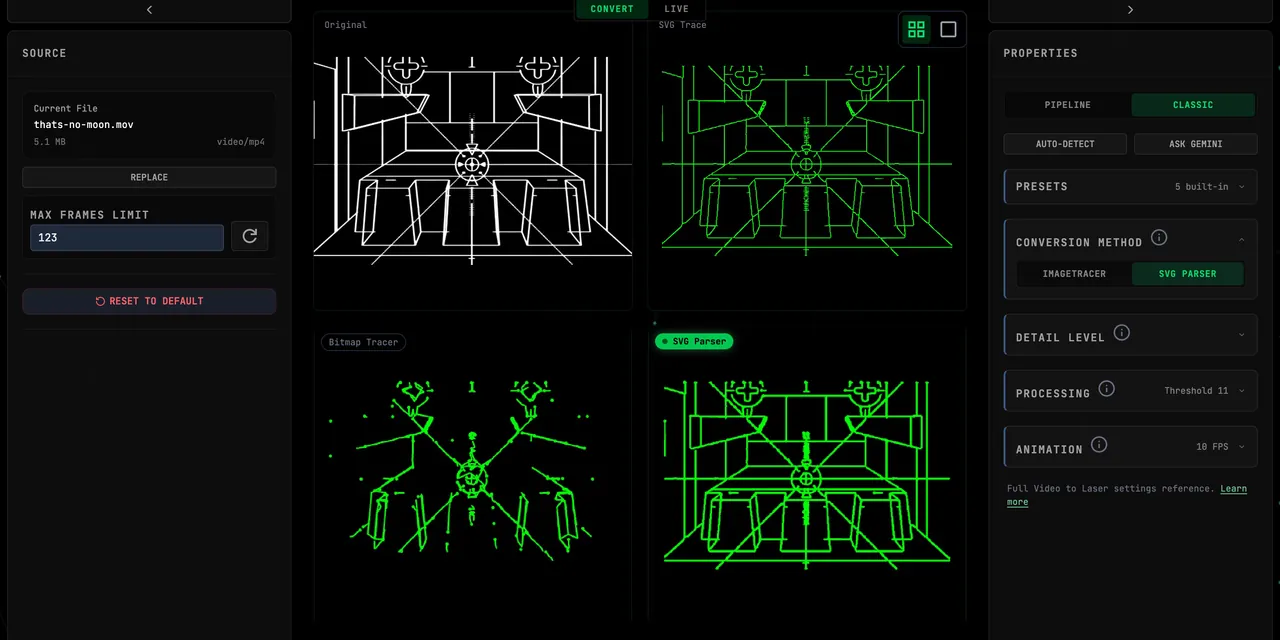
Open Video to Laser in the browser. CONVERT turns a file into ILDA frames with SVG Parser, ImageTracer, or Edge Tracer and a per-frame safety report. LIVE traces a camera, screen, or file and streams Helios in Chrome or Edge, or Ether Dream and LaserCube through the macOS Bridge.
What does video to laser mean?
Video to laser means tracing the edges of a moving picture — a file, a camera, or a screen — into scanner paths a projector can draw. It is not a beat-reactive party fixture that washes the room when the kick hits. The result is either an ILDA animation you can hand to a player, or a live point stream to a DAC.
The tool lives at Video to Laser inside BT Laser Studio. This page is the how-to: Convert versus Live, the three tracers, footage that traces, and how hardware connects.
How do you convert a video file to ILDA?
Open Video to Laser and leave the toggle on CONVERT. Drop an MP4 or WebM — MOV usually works; formats the browser cannot decode are rejected. Pick SVG Parser, ImageTracer, or Edge Tracer, tune detail and smoothing, then scrub the frames and read SAFETY CHECK. Press Download ILD for the complete animation, or Open Viewer to inspect it in the ILDA Viewer.
Creating and previewing start free. Clean ILDA exports are three per calendar month below Studio, and unlimited on Studio. Current USD amounts are on Pricing.
HOW TO DO IT
Open Video to Laser
Go to Video to Laser in Chrome or Edge. Nothing to install. Creating and previewing start free, with no card required.
Choose CONVERT or LIVE
CONVERT is the file workflow: upload, trace frame by frame, download ILDA. LIVE traces a camera, a screen or window, a local file, or a BeamTracer visualizer and can drive a DAC.
Load footage or a sample
Drop an MP4 or WebM, or click DANCE SILHOUETTE, NOT A MOON, or KABOOM. High-contrast silhouettes and flat motion graphics trace cleaner than textured live footage.
Pick a tracer and preview
Use SVG Parser for clean geometric motion graphics, ImageTracer for natural edges, or Edge Tracer for busy photos. Scrub the frames and read SAFETY CHECK before you export or arm hardware.
Download ILD or stream a DAC
In CONVERT, press Download ILD. In LIVE, connect HELIOS over USB, or use the macOS BeamTracer Bridge for ETHER DREAM and LASERCUBE. Preview on screen is not a physical safety certificate.
How do CONVERT and LIVE differ?
CONVERT is a file-to-file job. It extracts frames, traces each one, and writes a deterministic ILDA sequence. What you download is the animation; it does not keep reacting to new sound later.
LIVE is a source, not a converter. It traces a camera, a screen or window (including another app such as Resolume), a local file, or a BeamTracer visualizer as the picture moves, and can drive a DAC in real time. Show-ready setups — a logo reveal, a VJ follow, a camera silhouette — are in the Live Laser Show recipe.
Which tracer should you use?
SVG Parser favors clean line fidelity and geometric shapes: After Effects or Cinema 4D motion graphics, and screen recordings of vector software. ImageTracer is the flexible start for live footage with natural edges. Edge Tracer extracts outlines from real photos and noisy scenes; Edge High and Edge Low control how selective it is.
When in doubt, try SVG Parser first. If the paths look messy, switch to ImageTracer, or press Auto-Detect in the Properties panel. The full control list is on the Video to Laser docs.
What footage traces cleanly?
High-contrast silhouettes and flat-color graphics on a dark background convert best. The built-in DANCE SILHOUETTE example is that look. NOT A MOON and KABOOM start with settings tuned for denser line work. Skin tones, fabric texture, grain, and busy rooms produce thousands of tiny paths — lower the detail, raise smoothing, or use Edge Tracer, and expect a more abstract result.
How do you send Live output to a Helios or a network DAC?
Helios talks to the browser over WebUSB. Plug the DAC in over USB, stay in Chrome or Edge, open LASER OUTPUT, select HELIOS, and click CONNECT HELIOS. Choose the device in the browser's USB picker. No Bridge and no extra driver. WebUSB is Chrome and Edge only — see Laser DAC Output.
Ether Dream and LaserCube sit on the local network, which a browser cannot reach alone. Install the free macOS BeamTracer Bridge, keep it running on the same Mac as the browser, then pick ETHER DREAM or LASERCUBE. Arm and START from the safety dock in the browser, not in the Bridge. Setup notes live in the Bridge guide.
Live hardware output is a Studio feature with three trial sessions per account. You can rehearse the whole look in Preview without a projector.
How does this compare with Modulaser and MadLaser?
Several good tools already turn video into laser, and they are the right choice when your show already lives in a desktop node graph or a mapping suite.
| BeamTracer Video to Laser | Modulaser | MadLaser | |
|---|---|---|---|
| Where it runs | Chrome or Edge, no install | Desktop app | MadMapper extension, desktop |
| Typical input | File (CONVERT) or camera / screen / file (LIVE) | NDI, Syphon, Spout, and a node graph | Realtime video inside a mapping project |
| What it is for | Browser file-to-ILDA and live trace | Show-control pipelines next to Resolume-class tools | Realtime video vectorisation on a mapped stage |
| Output | ILDA file, or live Helios / Bridge DAC | Laser from the desktop graph | Live laser from the mapped video |
Modulaser and MadLaser excel at Resolume, NDI, Syphon, and Spout show-control pipelines. BeamTracer is the browser path: drop a file or share a screen, preview the trace, export ILDA or stream a supported DAC — without installing a desktop editor for that half. It is not the only browser ILDA tool. LaserShowGen also offers a web editor. An offline FFmpeg-to-Potrace pipeline is another file-conversion route if you already work that way. Compare the workflow you actually need and try yours before you commit.
FREQUENTLY ASKED QUESTIONS
CONVERT uploads a video, traces each frame, and writes a deterministic ILDA animation you can download. LIVE traces a camera, screen, file, or visualizer continuously and can stream a DAC in real time. Switch the toggle at the top of Video to Laser. Both workspaces share the same page.
Open the Video to Laser toolSVG Parser favors clean line fidelity and geometric shapes — motion graphics and screen recordings of vector software. ImageTracer is the flexible start for live footage with natural edges. Edge Tracer extracts outlines from photos and noisy scenes; Edge High and Edge Low control how selective it is. When in doubt, try SVG Parser, then ImageTracer, or press Auto-Detect.
Tracing methods in the docsHigh-contrast silhouettes and flat-color graphics on a dark background convert best. DANCE SILHOUETTE is the built-in example of that look. Skin tones, fabric texture, grain, and busy rooms produce thousands of tiny paths — use a lower detail setting, stronger smoothing, or Edge Tracer, and expect a more abstract result.
Use Chrome or Edge for Video to Laser and for Helios. Helios uses WebUSB, which other browsers do not implement. Ether Dream and LaserCube need the macOS BeamTracer Bridge in addition to that browser. Firefox and Safari can view some pages, but they are not the laser-output path.
Browser supportCreating and previewing are free to start, with no card required. Clean ILDA exports are three per calendar month below Studio, shared with the other ILDA tools, and unlimited on Studio. Live output to a real DAC is a Studio feature; every account includes three laser-DAC trial sessions. Check Pricing for the current USD amounts.
Open PricingNo. SAFETY CHECK, the laser preview, and the simulator are composition tools. They do not certify a physical projector, venue, or audience-scanning setup. Review scanner-load reports, read the laser safety guide, and follow the projector's hardware limits, masks, interlocks, and venue procedures before any real beam.
Laser safety guideOPEN VIDEO TO LASER AND TRACE A CLIP
Start with a sample or a high-contrast file. Connect hardware only after you have read the laser safety guide and the limits for your own projector.