
BT LASER STUDIO
Make ILDA Laser Files in Your Browser
Convert artwork, text, and video into ILDA files. Build animations to an audio track and inspect their paths in a 3D preview. Start designing in your browser without a projector.
Free to start · No credit card · Nothing to install
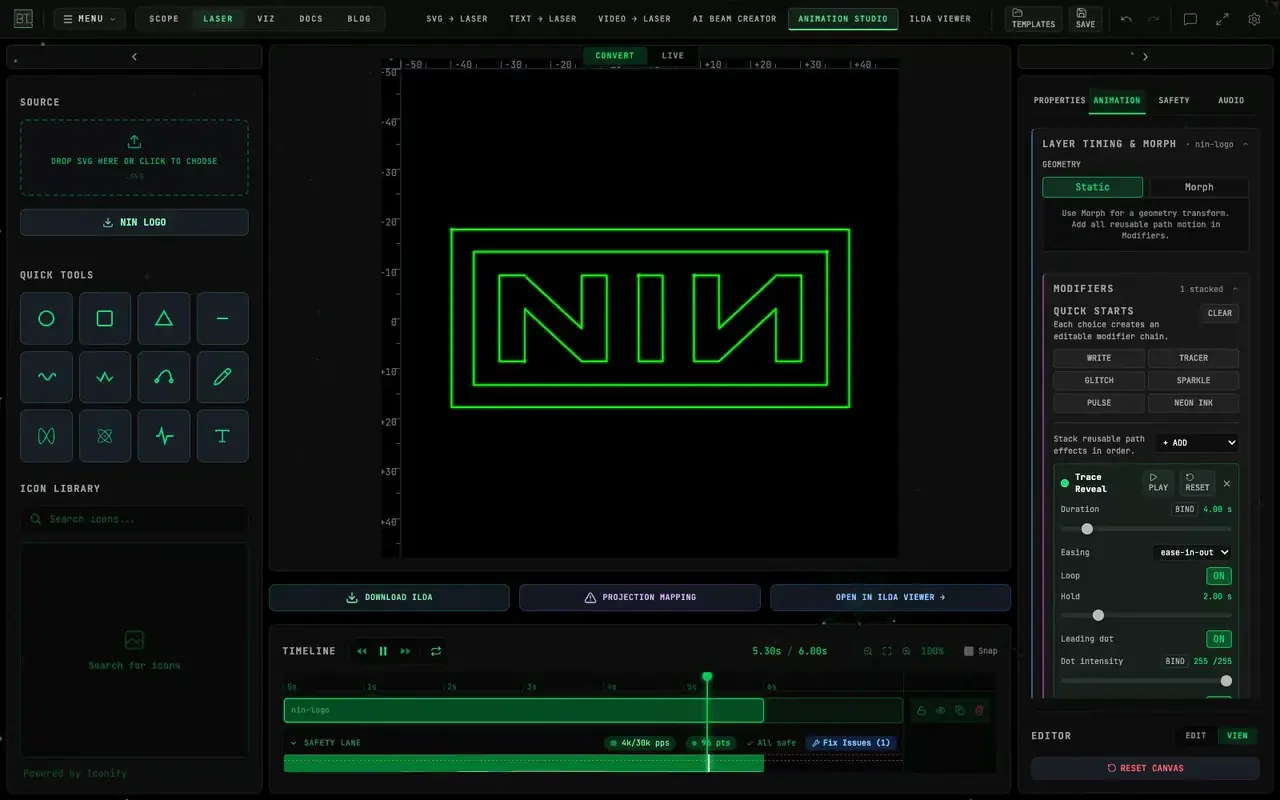
Bring artwork, text, video, or an idea into a browser tab. Trace it, build movement on the timeline, and inspect the result in a 3D preview before involving a projector. Scanner-load reports help you review the content; they cannot certify a physical installation.
Export ILDA Format 5 for compatible show software or file players. Check the formats your player supports and preview the exported file before using it with hardware.
Use an uploaded track to drive motion while you compose. ILDA export records that motion as a fixed sequence of frames; it contains no audio and does not react to new sound during playback. Cue the sequence with the intended track in your playback setup.
If the source is a movie or a live camera, the video to laser walkthrough covers CONVERT, LIVE, the three tracers, Helios, and the Bridge.
If the source is XY oscilloscope music rather than artwork or video, start with oscilloscope to laser — that path lives in OSC-1, then can land here as an ILDA file.
SEE IT IN ACTION
One-click image-to-laser conversion with a built-in safety check, the full tool set, and the free ILDA viewer with a 3D beam preview. Follow along in the written guide or browse all tutorial videos.
WHAT IT DOES
SEVEN TOOLS, ONE WORKFLOW
Convert images, text, and video to ILDA; build animations on a timeline; generate beam shows from a description; inspect and diagnose files; preview them full-screen.
MOTION AUTHORED TO AUDIO
Map an audio track to shape movement while composing, then export the finished motion as an ILDA sequence. Playback repeats the authored animation; your player controls its timing.
SAFETY IN THE LOOP
Inspect scanner-load reports and the viewer’s stress heat map. Use the 3D preview for composition and scale, then apply the physical limits and safety procedures required by your actual rig.
DIRECT TO HARDWARE
Export ILDA for a compatible player. Supported live-output paths are available with the Studio plan; native connections require the BeamTracer Bridge and a supported device.
WHAT IS IN THE BOX
- Tools
- 7
- Export format
- ILDA Format 5
- Fonts
- 1500+ for text conversion
- Video tracing
- 3 methods, per-frame safety report
- Laser hardware
- Helios · Ether Dream · LaserCube
- Install
- Browser tools; Bridge for native hardware paths
- Best in
- Chrome or Edge
THE TOOLS
- Image to LaserVector artwork to ILDATrace a PNG, photo, logo, or SVG. Preserve or change its colors, preview laser paths, inspect scanner load, and export SVG or ILDA.
- Text to Laser1500+ fonts for laser graphicsType a word, pick from over fifteen hundred fonts, and export it as ILDA. For band names, event titles, countdowns, and anything else spelled out in light.
- Video to LaserFootage to laser animationTurn a video clip into a laser animation. Three tracing methods handle different source material, and a per-frame safety report shows where scanner load is heaviest.
- Animation StudioTimeline, keyframes, audio reactivityBuild animations with layers, keyframes, shape morphing, and motion paths. Use audio to author the movement, then export the finished frames for a compatible ILDA player.
- Beam CreatorDescribe a beam show, generate itDescribe the beam show you want, then review and refine the generated shapes on the timeline before exporting to ILDA.
- ILDA ViewerALWAYS FREEInspect, diagnose, preview in 3DOpen an ILDA file to inspect its frames, review diagnostics, and see scanner stress as a heat map. Preview the paths in a 3D venue with a figure for scale.
- Screensaver PreviewFull-screen ambient playbackPlay laser output back full-screen as a screensaver — for testing how content reads over a long run, and for leaving something on the wall between sets.
GETTING STARTED
Pick your input
Artwork, text, video, or a description. Each has its own tool, and they all end at the same place.
Check the safety report
Scanner load is reported as you work, and the 3D preview shows the frame in a room rather than on a black background.
Export or stream
Download ILDA Format 5 for a compatible player. For live output, use a supported connection and check its plan and device requirements.
HOW IT COMPARES
The established laser suites are deep, respected desktop software — decades of show-control features, timeline programming, and hardware knowledge that BeamTracer does not claim to replace. If you run a full show rig, you will likely keep one.
BT Laser Studio offers a browser-based starting point for creating and inspecting content. Try the tools without a projector, then choose the plan and output path that fit your workflow. Use Chrome or Edge for the full browser experience.
ILDA export lets you take the finished frames into compatible software or a file player. Track-driven movement remains the animation you authored; it does not become a live audio-reactive show when the file leaves BeamTracer.
WHO IT IS FOR
BEDROOM AND CLUB LASERISTS
Own a projector and a DAC but no content pipeline? This is the missing half — make your own frames instead of recycling the files that shipped with the unit.
VJs ADDING LASER
Convert the logos, type, and loops you already use into ILDA. Author movement to a chosen track and cue the exported animation in your show setup.
EVENT AND PRODUCTION CREW
Turn a client logo into traced paths and review the composition together in a 3D preview. Assess the physical installation separately before projection.
ANYONE INSPECTING A FILE
The ILDA Viewer is free for everyone. Inspect frames, review scanner-load diagnostics, and preview paths before choosing how to use the file.
FREQUENTLY ASKED QUESTIONS
ILDA is an interchange format for laser graphics. BeamTracer exports Format 5: frames containing 2D positions and color. The file contains the authored graphics, not an audio track or a live reaction to sound.
Use software or a file player that supports ILDA Format 5. Import a short test sequence and check playback before preparing a full show; support and timing controls vary by player.
No. You can create and inspect content in the browser without hardware. The 3D preview is a simulation. Live output needs a supported device and connection; native hardware paths require the macOS Bridge.
Yes. Video to Laser has CONVERT for a file to ILDA frames with three tracers, and LIVE for a camera, screen, or file to a DAC. Creating and previewing start free; clean ILDA exports and live hardware have plan limits on Pricing.
Video to Laser walkthroughAnimation Studio can turn a stereo XY WAV into an ILDA animation. Live DAC streaming of that XY layer is not available here — use OSC-1 for the live Helios or Bridge path, then bring an exported ILDA file into these tools if you need the viewer or a player.
Oscilloscope to laser walkthroughA preview or exported file cannot certify safe projection. Review the scanner-load reports, read the laser show safety guide, and follow your projector’s physical limits and the safety procedures for the installation before using real hardware.
Use Chrome or Edge for the full experience. Hardware connections have additional device and companion-app requirements; check the guide for the output path you plan to use.
DESIGN THE SHOW BEFORE YOU OWN THE LASER
An image, a word, or a video clip is enough to see the whole workflow end to end — no hardware required until you want it. The viewer is free forever if you just want to inspect a file.