
OSC-1 OSCILLOSCOPE
Online XY Oscilloscope for Oscilloscope Music and Laser Art
An XY scope with CRT-style glow and a built-in three-oscillator synthesizer. Start free in your browser, then explore output to supported laser hardware.
Free to start · No credit card · Nothing to install
How is oscilloscope music made?
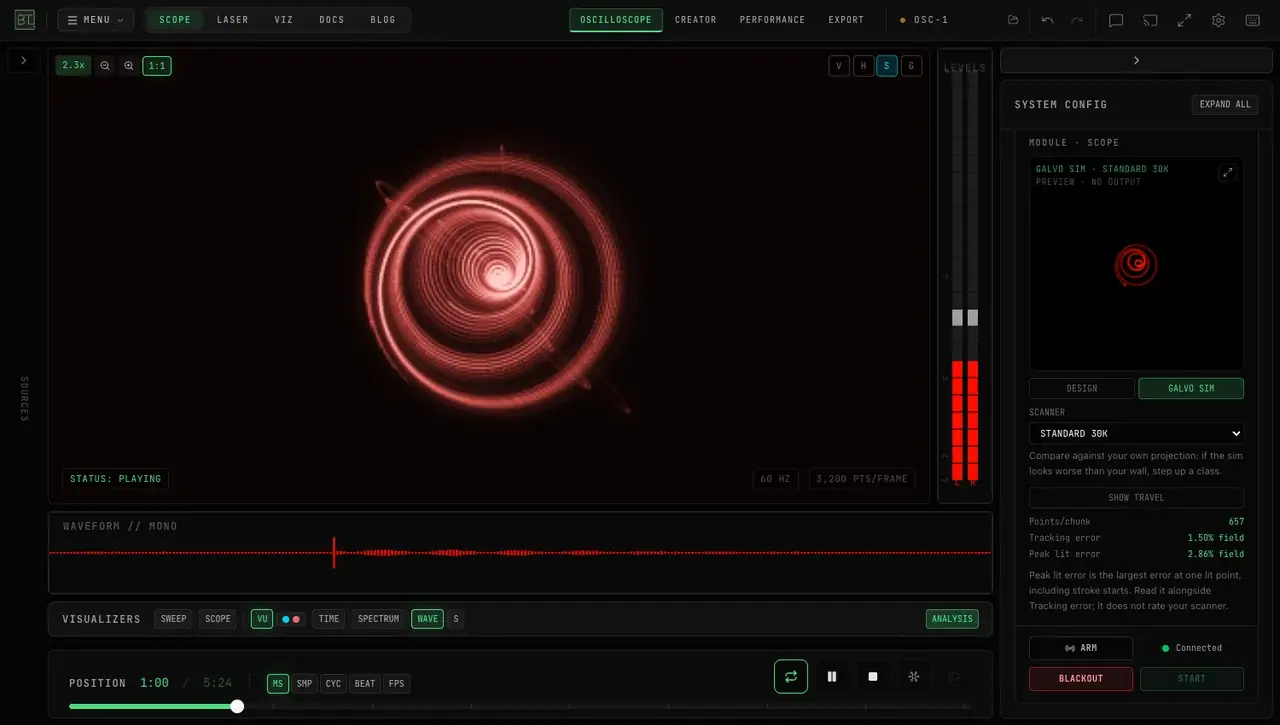
Oscilloscope music is made by using a stereo audio signal as a drawing instrument. On an oscilloscope in XY mode, the left channel moves the beam horizontally and the right channel moves it vertically, so each pair of left and right samples is one point and the sound traces a picture. The shape you hear is the shape you see: change the waveform and the image changes with it. Traditionally that meant finding an analog oscilloscope and wiring it to an audio interface.
OSC-1 does the same thing free in your browser, with nothing to install. It simulates the phosphor glow of a CRT screen and has a three-oscillator synthesizer built in, so you can play a note and watch it draw, or load a stereo file you already have and see the picture inside it.
To draw your first figure step by step, follow the oscilloscope music beginner guide.
Every control is explained in the OSC-1 documentation.
Choose a crisp vector display or a glowing CRT-style trace, then adjust its color, brightness, and persistence. Eight presets include looks inspired by the Tektronix 465 and HP 1740A.
You do not need a signal source to start. A three-oscillator synthesizer is built in, with dual envelopes, an LFO, and over fifty presets, so you can draw with sound immediately. When you want to go the other way, OSC-1 streams to real laser hardware and exports ILDA files.
Ready to try it? Open the OSC-1 app in Chrome or Edge.
Once a single shape works, see how to draw two things at once on an oscilloscope: adding two signals together makes one hybrid shape, not two.
When the drawing is ready for a projector, the oscilloscope to laser walkthrough covers Helios, the macOS Bridge, and ILDA export.
To turn an oscilloscope music recording into a laser animation file, see oscilloscope music in Animation Studio.
SEE IT IN ACTION
One click of oscilloscope music — the audio literally draws the image — then scope presets, beam styling, and a 3D model traced live on the scope. Follow along in the written guide or browse all tutorial videos.
WHAT IT DOES
8 SCOPE PRESETS
Tektronix 465, HP 1740A, Hitachi V-650F, Amber CRT, Laser Sharp, and your own saved looks. Adjust the color, brightness, and persistence to suit the signal.
BUILT-IN SYNTHESIZER
A three-oscillator subtractive synth with dual ADSR envelopes, an LFO, more than fifty presets, and full MIDI Learn. Play it from a keyboard or a controller.
15 XY BEAM EFFECTS
Rotate, Swirl, Ripple, Wobble, BitCrush, Vortex, Kaleidoscope, and more — each one controllable live from MIDI or OSC while you play.
LASER OUTPUT AND ILDA EXPORT
Connect Helios directly over USB in Chrome or Edge, or use the macOS BeamTracer Bridge for supported Ether Dream and LaserCube devices. Export ILDA for compatible players. Check plan and safety requirements before output.
WHAT IS IN THE BOX
- Scope presets
- 8, plus your own
- Synthesizer
- 3 oscillators · dual ADSR · LFO · 50+ presets
- XY beam effects
- 15, MIDI and OSC controllable
- Laser hardware
- Helios · Ether Dream · LaserCube
- Export
- ILDA Format 5 · video
- Install
- Browser creation; macOS Bridge for supported network DACs
- Best in
- Chrome or Edge
GETTING STARTED
Open it
Nothing to install and no account needed. The scope and the synthesizer are both there on the free tier.
Make a signal
Play the built-in synth, load a stereo file, or use a live input. Anything with a left and a right channel will draw.
Shape the beam
Pick a scope preset for the look you want, adjust phosphor persistence and beam intensity, then add XY effects. Export ILDA or stream to a laser when you are happy.
HOW IT COMPARES
Oscilloscope-music tools differ in their input formats, displays, and connections. Compare the workflow you need: viewing a stereo file, composing in a DAW, importing a model, or connecting hardware.
OSC-1 offers editable scope presets, a built-in synth, and a browser preview. Choose a starting look, then adjust the trace while you listen.
Create and preview in the same browser workspace, then export ILDA for a compatible player. Supported network DAC connections additionally use the macOS BeamTracer Bridge.
WHO IT IS FOR
OSCILLOSCOPE MUSICIANS
Compose and audition XY work without owning a tube. Load your own stereo files and watch the drawing they produce, or write new ones on the built-in synth.
LASER ARTISTS
Preview XY artwork on screen, then use a supported DAC connection or export ILDA for compatible software. A screen preview does not certify a physical projector setup.
ELECTRONICS AND AUDIO STUDENTS
Lissajous figures, phase relationships, and waveform shapes are far easier to understand when you can hear and see them at the same time, with a beam that behaves like a real one.
PRODUCERS CHECKING A MIX
XY display is an honest stereo-field and phase-correlation tool. A mono-compatible mix looks a particular way, and a phase problem is obvious on sight.
FREQUENTLY ASKED QUESTIONS
No. OSC-1 simulates the beam and the phosphor in software, including how the trace brightens where it slows down. If you do own hardware, you can still export or stream signal to it.
Yes. Load a local stereo file, use a live input, or play the built-in synthesizer. Anything that produces a stereo signal can drive the display.
Open the built-in synthesizer, choose a preset, and play a note. You can watch the trace change while you adjust the sound.
Yes. The XY signal that draws on screen can steer a laser’s scanners. In OSC-1’s LASER OUTPUT panel, connect a Helios over USB in Chrome or Edge, or an Ether Dream, LaserCube or IDN device through the free macOS BeamTracer Bridge; or export an ILDA frame. The DAC Simulator is free; hardware output is a Studio feature with three free sessions. Read the laser safety guide first.
Oscilloscope to laser walkthroughHelios connects directly over USB in Chrome or Edge. Supported Ether Dream, LaserCube and IDN devices use the macOS BeamTracer Bridge. Live output is a Studio feature with trial sessions; check Pricing and the hardware guide before connecting.
Laser DAC setup guideYes, with the same free tier as the rest of BeamTracer: five presets, 1080p export, and a watermark on exported media, with no card required. Paid tiers lift the limits and add commercial-use rights.
DRAW WITH SOUND
The synth is built in, so there is nothing to prepare. Open it and turn a note into a shape.