
FX Rack walkthroughs
FX Rack effects reference
Compare what each FX Rack effect does.
BeamTracer FX Rack offers effects for color, motion, tracking, particles, distortion, and picture treatments. Use this reference to compare what each effect does. Add effects from ADD AN EFFECT, then reorder the rack to decide how the picture passes through the stack.
Which effects are there?
Effects are grouped into families of similar effects, the same groups ADD AN EFFECT shows. Open a family to see its effects; hover a thumbnail to play it, and select it to open Performer mode with that effect on.
| Effect | What it does |
|---|---|
Visual Source | Puts your camera, a screen, a video or an image on the canvas under every effect below it; the visualizer shows through where PICTURE is below 1, or with VISUALIZER: OVER flies over the picture wherever its own background is transparent (set its BACKGROUND OPACITY to 0). SPEED plays a video or an example slower or faster. HIT punches Picture. |
Track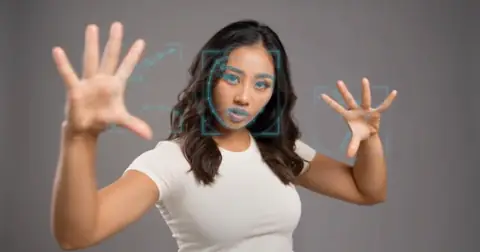 | Follows a face, hands, a face and hands together, a body, objects, the contours or whatever moves in the visual source (or in the picture itself) and draws over them: tracking boxes, plexus lines, a constellation, picture tiles, a scan, and lightning between fingertips, eyes or contours. The looks stack and move with the music. HIT punches Intensity. |
Hand Frame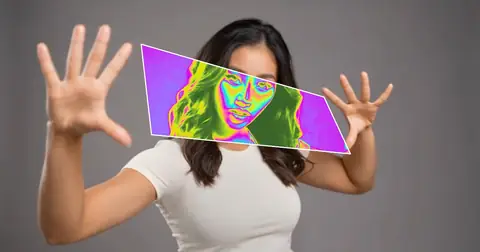 | Hold up both hands and a window opens between your thumbs and index fingers: inside it the picture turns to moving color, picked by brightness from a palette that cycles. It follows the visual source (or the picture itself) and closes when a hand leaves. HIT punches Intensity. |
Mask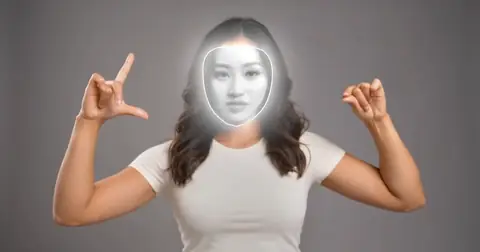 | Keeps every effect below it in the rack inside your face's outline, the window between your hands, TRACK's boxes or the whole person (or outside it), so ASCII, a dither or a thermal camera plays only there or only behind you; DEAL EACH gives every box its own effect. It follows the visual source (or the picture itself) and fades out when nothing is found. HIT punches Grow. |
Portrait Window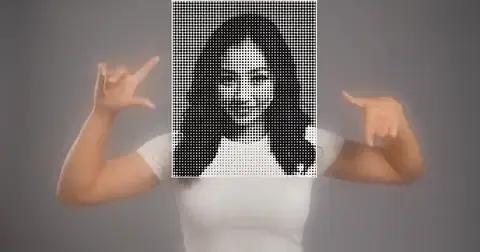 | A window that follows the face: inside it the picture is printed as a halftone or an engraving, outside it the backdrop blurs. It follows the visual source (or the picture itself), or holds at the center. HIT punches Window Width. |
Where do I go next?
Choose a walkthrough in the FX Rack overview, or use the OSC reference for controller addresses.