
BEAMTRACER · AUDIO ANALYSIS ENGINE
GIVE YOUR AUDIO LEVELS CONTEXT
Check integrated, short-term and momentary LUFS, true peak and loudness range in BeamTracer. Analyze an audio file and compare against target references.
Free to start · No credit card · Nothing to install
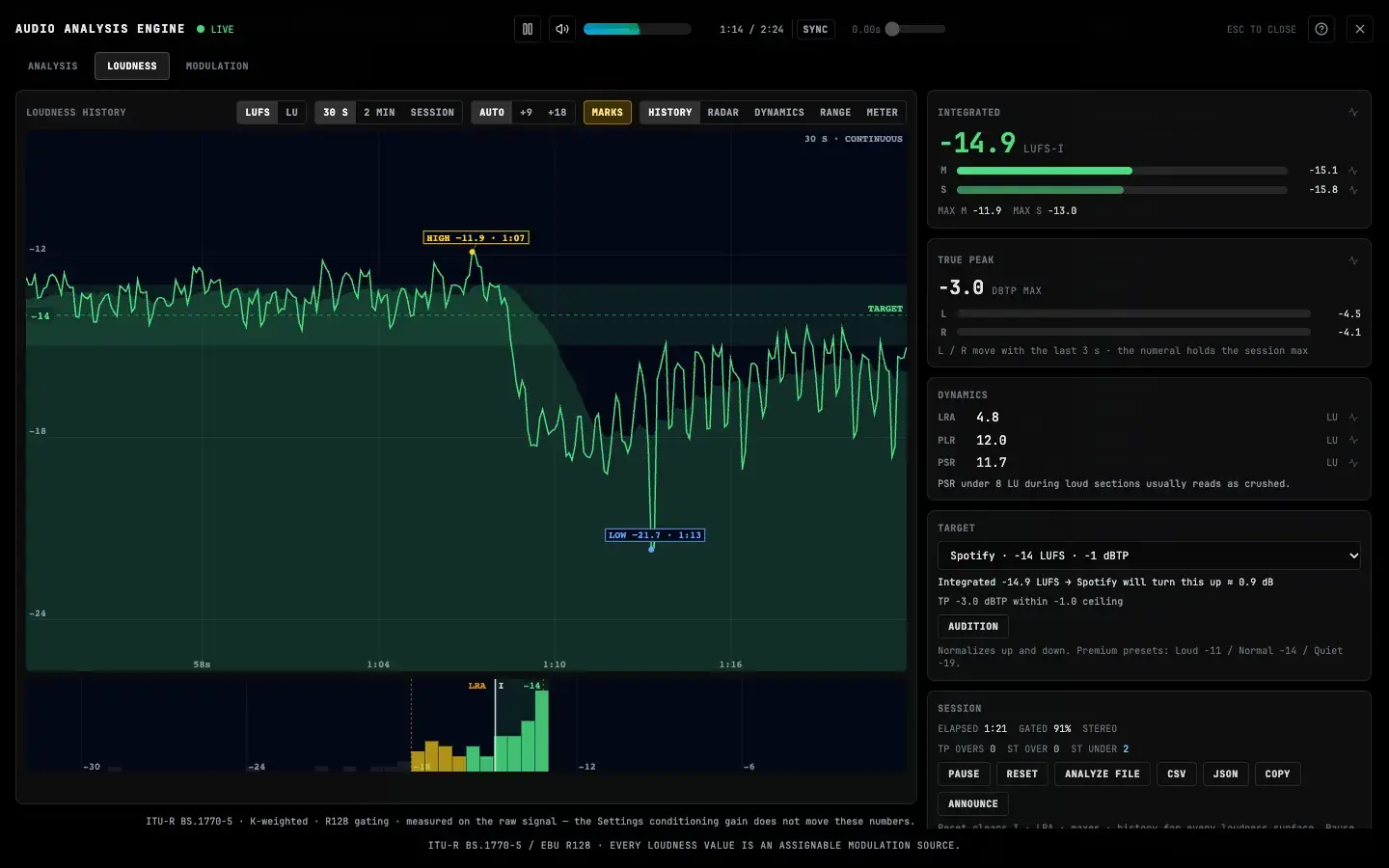
What can you check with the browser loudness meter?
BeamTracer’s Loudness tab measures momentary, short-term and integrated LUFS, true peak and loudness range. Follow a live source or analyze an audio file to see how its levels change over time. Compare the measurements with a selected target reference before deciding what to adjust in your audio editor.
WHAT YOU CAN SEE AND DO
SEPARATE THE MOMENT FROM THE PROGRAM
Momentary and short-term readings follow the current passage. Integrated loudness summarizes the measured program so a brief loud hit does not become your only reference.
KEEP PEAKS AND DYNAMICS IN VIEW
True peak tracks inter-sample peaks in dBTP. Loudness range and peak-to-loudness ratios add context about variation and headroom beyond one LUFS number.
ANALYZE A COMPLETE FILE
Use ANALYZE FILE to inspect a track without playing it through from start to finish. Switch between FILE and LIVE while keeping the live measurement separate.
COMPARE AGAINST A REFERENCE
Choose a platform target, read the history against its target band, and review the predicted level change. Audition preview helps you hear a level comparison; it does not rewrite your file.
TRY IT WITH YOUR TRACK
OPEN THE LOUDNESS TAB
Open Viz, press A and choose Loudness. Play the demo or your source to start live measurement.
MEASURE YOUR PROGRAM
For a complete track, choose ANALYZE FILE. For a live pass, let the intended program play and allow the readings to settle.
COMPARE AND MAKE A DECISION
Choose a target reference and inspect loudness, true peak and history together. Make any final audio changes in your editor and measure again.
THE ANALYSIS BEHIND THE VIEW
- Loudness
- Momentary (400 ms) · short-term (3 s) · gated integrated LUFS
- Peaks and dynamics
- True peak (dBTP) · loudness range (LU) · PLR · live PSR
- Measurement basis
- ITU-R BS.1770-5 loudness with EBU R128 gating; input before analysis processing
- Limits
- Target references guide comparison; they do not certify delivery acceptance or guarantee platform playback levels
EXPLORE THE ENGINE
- Audio Analysis EngineExplore spectrum, stereo, rhythm and loudness in BeamTracer. See what your track is doing, then route musical signals into visual controls in Viz.
- Spectrum and Stereo AnalysisSee frequency balance, waveform shape, stereo width and changes over time in BeamTracer’s browser Audio Analysis Engine.
Choose a look in Audio Visualizers, learn audio modulation, or check audio source compatibility.
RELATED ARTICLES
- How to Read a Loudness Meter: LUFS in Plain LanguageWhat LUFS actually measures, why it replaced RMS, and what momentary, short-term, integrated, true peak and LRA mean — explained on a free browser meter.
- Streaming Loudness Targets: Every Platform, SourcedSpotify, Apple Music, YouTube, Tidal and the rest: every platform's real playback numbers with a source class on each — plus a live loudness calculator.
- PSR, PLR and LRA Explained: How Dynamic Is Your Master?Learn what PSR, PLR and LRA measure, how to interpret low PSR readings, and when to use live playback or whole-file analysis in BeamTracer.
FREQUENTLY ASKED QUESTIONS
No. File analysis measures the audio, and audition preview lets you hear a predicted level adjustment. Neither action exports a normalized master or applies a mastering limiter to your source file.
No. A verdict compares the measured signal with the selected reference. Delivery specifications can include requirements beyond loudness, and platform playback behavior can differ. Check the actual delivery requirements.
Momentary and short-term measurements need their full windows. Integrated loudness represents the program measured so far, and loudness range needs a longer passage. Measure the material you intend to deliver rather than trusting the first few seconds.
START WITH A SOUND YOU KNOW
Open the engine, play a track, and follow one phrase across the views.