
Laser Clearance Reference
Preview clearance planes, screen height, and human scale in a simulated venue.
Laser safety compliance is a legal requirement for public shows in the United States. BeamTracer provides preview references for arranging a simulated venue. They do not assess beam exposure or certify a show.
BeamTracer's tools are visualization aids for content planning — not a substitute for professional laser safety certification. For any public show with Class IIIb or Class IV lasers, consult a certified Laser Safety Officer (LSO) and follow all applicable FDA regulations.
Why Laser Safety Matters
Class IIIb (5mW–500mW) and Class IV (>500mW) lasers can cause immediate, permanent eye injury if directed at unprotected eyes. The FDA Center for Devices and Radiological Health (CDRH) establishes minimum audience separation distances and prohibits directing laser beams into audience areas.
The Nominal Ocular Hazard Distance (NOHD) and Extended Nominal Ocular Hazard Distance (ENOHD) define the minimum safe distances based on beam power, wavelength, and divergence.
The Clearance Reference Panel
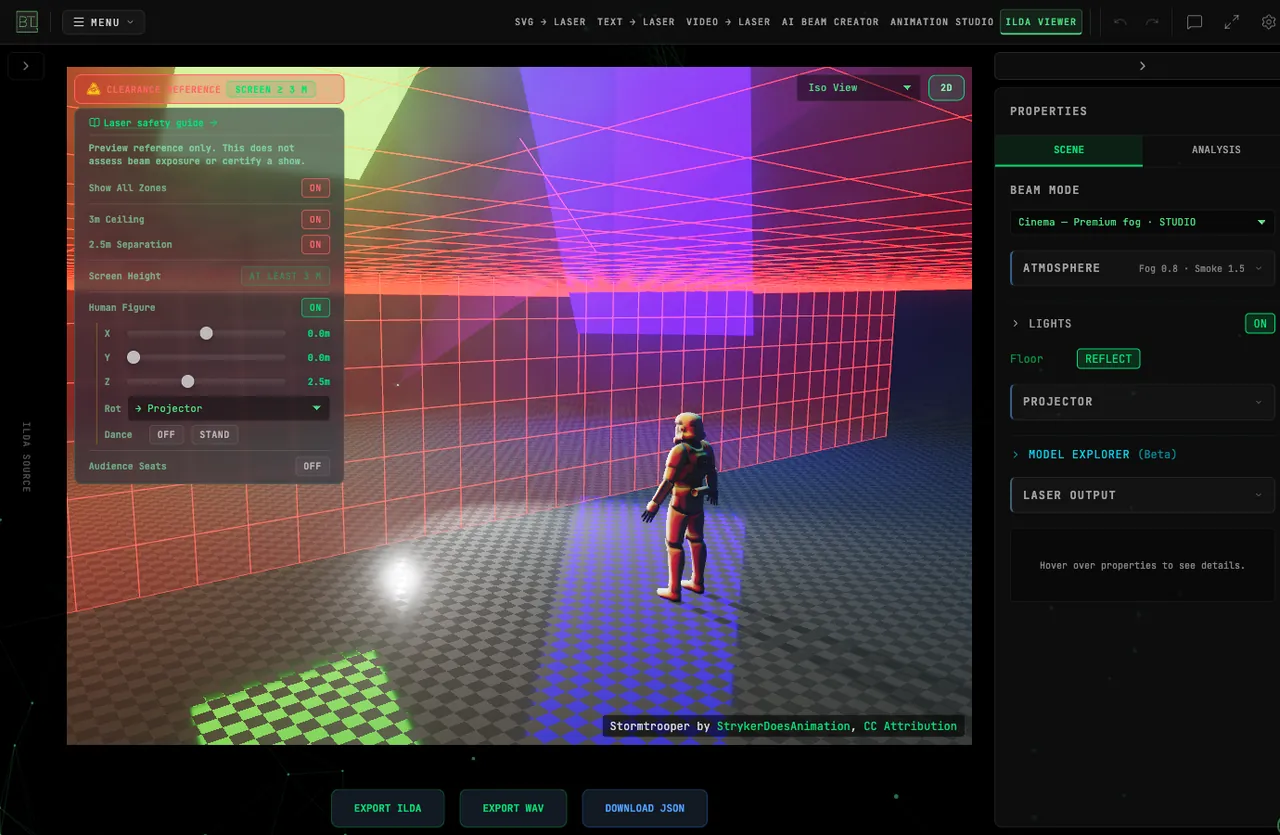
In the 3D Beam Viewer, click Clearance reference in the top-left of the 3D view. Its badge reads Screen ≥ 3 m when the preview screen's bottom edge is at least 3.0 m above the scene floor, or Screen < 3 m when it is lower. This describes only the simulated screen position, not the height of every beam or the clearance around an audience. The dropdown panel contains:
Show All Zones
A master toggle that switches both hazard-zone visualizations on or off at once.
3m Ceiling
Visualizes the 3.0 m (9 ft 10 in) vertical clearance above any surface an audience member can stand on. Radiation above the Class I limit must stay above this plane.
2.5m Separation
Visualizes the 2.5 m (8 ft 2 in) separation that the same rule requires laterally and below — measured from any place the audience is permitted to be, not from the projector. Height rulers and distance markers accompany both zones so you can read the clearances directly in the scene.
Where these two numbers come from. They are not in 21 CFR 1040 itself. That regulation is what you need permission to exceed: §1040.11(c) caps a demonstration laser product at Class IIIa (5 mW), and §1040.10 is the hardware performance standard. The 3.0 m / 2.5 m figures are conditions attached to the FDA variance you apply for on Form 3147, and they read as a single sentence — no access to radiation above Class I limits, by anyone other than operators, performers or employees, at any point less than 3.0 m above a standable surface or 2.5 m below or laterally from a permitted place.
Condition numbering differs between the form and the approval letter, so cite the wording rather than a number, and read the conditions on your own approval letter — yours govern your show. Some states are stricter: Arizona applies its threshold at Class 2 rather than Class I.
Screen Height
When the preview screen's bottom edge is below 3.0 m, click Raise preview screen to move its center to 4.5 m. The bottom edge then sits at the 3.0 m reference, and the row reads At least 3 m.
This action only moves the 3D preview's projection screen. It does not change your ILDA content, exported files, projector position, or hardware output. Raising the preview screen does not establish safe audience clearance in a real venue. The panel reminds you: Preview reference only. This does not assess beam exposure or certify a show.
Human Figure
Toggle a 1.7 m human figure for scale reference, positioned with X / Y / Z sliders and a facing-direction selector (toward the projector, left, right, or away). In Cinema mode the figure can also Dance (with a Stand button to reset the pose).
Audience Seats
Toggle rows of audience seats for scale reference, likewise positioned with X / Y / Z sliders and a rotation selector. Use them to compare seating positions with the reference planes in the preview; assess actual audience clearance separately at the venue.
Planning Documentation
After arranging the zones, human figure, and seats to match your venue:
- Take a screenshot of the 3D safety view with the zones enabled
- Note the screen height and figure/seat positions used
- Include it in your show documentation package for your LSO review
General Laser Safety Practices
Beyond audience separation, professional laserists follow these practices:
- Beam stops — Physical apertures that block beams not in use
- Interlock systems — Emergency stop circuits that cut all laser output instantly
- Scanfail protection — Hardware that kills laser output if scanner feedback is lost
- Warm-up period — Allow scanners to reach operating temperature before show
- Key-switch control — Laser power only accessible to authorized operators
Further Reading
- ILDA Safety Resources — International Laser Display Association safety resources
- FDA Laser Products and Instruments — US FDA official guidance
- Understanding PPS — Scanner load and hardware limits
- 3D Beam Viewer — Full venue preview with safety grid
- Laser show safety guide — the illustrated version, with the safety overlays in the viewer
Getting the Beam Look
A practical guide to the 3D beam modes and their sliders — how to get a specific look, fix a preview that reads wrong, and inspect the bundled test patterns before hardware calibration.
Keyboard Shortcuts
All keyboard shortcuts for BT Laser Studio — global keys, panel toggles in every tool, plus the full ILDA Viewer and Animation Studio references.