
Laser Show Safety (US, 2026): Variance, 3 m Rule, Checklist
Running a laser show legally in the US means an FDA variance (Form 3147) obtained before the show, beams kept 3.0 m above and 2.5 m clear of the audience, every beam terminated on a surface that fully stops it, an E-stop plus a scan-fail safeguard, and a Laser Safety Officer wherever Class 3B or Class 4 lasers are used. No audience scanning without a separate variance.
Hi, I'm Trina with BeamTracer.com — this guide walks through the US rules that keep a laser show legal and your audience out of harm's way.
A laser show is one of the few effects where a single mistake can cause permanent eye injury in a fraction of a second — or land you in federal trouble. The good news: the rules that keep audiences safe are well-defined, and once you understand them, planning a compliant show becomes routine.
This guide explains how laser-show safety actually works in the United States, in plain language, with every figure traced to the bodies that set it: the FDA/CDRH, ILDA, ANSI Z136.1, IEC 60825-1, and the FAA.
The free ILDA Viewer in Orbit Mode, playing its bundled DOLPHIN test file. Show All Zones is on in the Clearance reference panel: the red grid overhead is the 3 m ceiling reference and the red walls are the 2.5 m separation reference. A dancing human figure stands 2.5 m from the preview screen. With the screen at its 1.5 m default, the badge reads Screen < 3 m and the dolphin's beams sweep through the space where the figure stands. The beams take each frame's color from the file, which cycles white, green and blue in this clip. Try it in the ILDA Viewer.
This is a general guide, not legal or safety-certification advice. Laser regulations are specific and consequential. Always confirm the current rules with the FDA CDRH, your state laser agency, and a certified Laser Safety Officer (LSO) before any public show. BeamTracer is an Amazon Associate and may earn from qualifying purchases via links on this page.
What are the non-negotiable rules for a US laser show?
| Rule | What it means |
|---|---|
| Get a variance | Any public Class IIIb/IV show in the US needs an FDA variance (Form 3147) — before the show |
| 3.0 m up, 2.5 m out | Beams above the Class I limit stay ≥3.0 m above any surface people stand on, and ≥2.5 m laterally from where they can reach |
| No audience scanning | Unless you hold a special audience-scanning variance and certified hardware |
| Terminate every beam | Each beam ends on a surface that fully stops it — never on people, mirrors, windows, or open sky |
| Two ways to stop | Physical e-stop/shutter plus a scan-fail safeguard; trained operator watching at all times |
| Protect eyes | Wavelength-rated safety glasses for anyone near the beam path during setup/testing |
What laser class is a show projector?
Show projectors are almost never "toys." Entry-level units start around 1 watt — already far above the danger threshold.
| FDA / CDRH class | IEC 60825-1 | Visible power | Hazard |
|---|---|---|---|
| Class II | Class 2 / 2M | ≤1 mW | Low — blink reflex protects you |
| Class IIIa | Class 3R | ≤5 mW | Moderate — direct viewing hazardous |
| Class IIIb | Class 3B | 5–500 mW | High — immediate eye hazard |
| Class IV | Class 4 | >500 mW | Extreme — eye, skin, and fire hazard |
The US legacy names (II/IIIa/IIIb/IV) and the international IEC names (2/3R/3B/4) describe the same thing. Modern hardware is usually labeled IEC; the FDA accepts conforming IEC products under Laser Notice 56.
Turning a projector down in software does not change its class. Power limit in the ILDA Viewer's LASER OUTPUT panel scales how bright the frames BeamTracer sends are. That helps while you set up, but the class comes from the most the projector can emit, which is what its label states.
A Class 4 projector running at 25% is still a Class 4 projector. Every rule below still applies to it, including the variance.
Do I need an FDA variance for a laser show?
In the US, laser products are governed by 21 CFR 1040.10 (the hardware performance standard) and 21 CFR 1040.11(c) (the rule for demonstration products, which includes shows).
Here's the key fact most beginners miss: 1040.11(c) caps a demonstration laser product at Class IIIa — just 5 mW of visible light. Anything brighter is illegal for a public show unless you obtain a variance.
A variance is the FDA's permission to exceed that 5 mW limit. You apply using FDA Form 3147 ("Application for a Variance from 21 CFR 1040.11(c)"). The variance is held by the show operator — the entity producing the show — not the projector manufacturer.
An accession number is not an approval. When a manufacturer reports a projector to the FDA, they get an accession number. It only means the FDA received a report. It does not mean the product is approved or safe, and it does not give you permission to run a public show. You still need your own variance.
Variance holders must also file an annual report (Form 3636) by September 1 each year — the FDA has canceled variances for missed reports.
How far must laser beams stay from the audience?
This is the number that protects your audience, and it has two parts — a detail that's easy to get wrong:
- Vertical: 3.0 m (9 ft 10 in) above any surface an audience member can stand on.
- Lateral (and below): 2.5 m (8 ft 2 in) from any place the audience can reach.
Both come from the conditions of FDA Form 3147. If you only remember the "3-meter rule," you've memorized half of it — the lateral 2.5 m boundary keeps beams off the side walls and barriers people can walk up to.
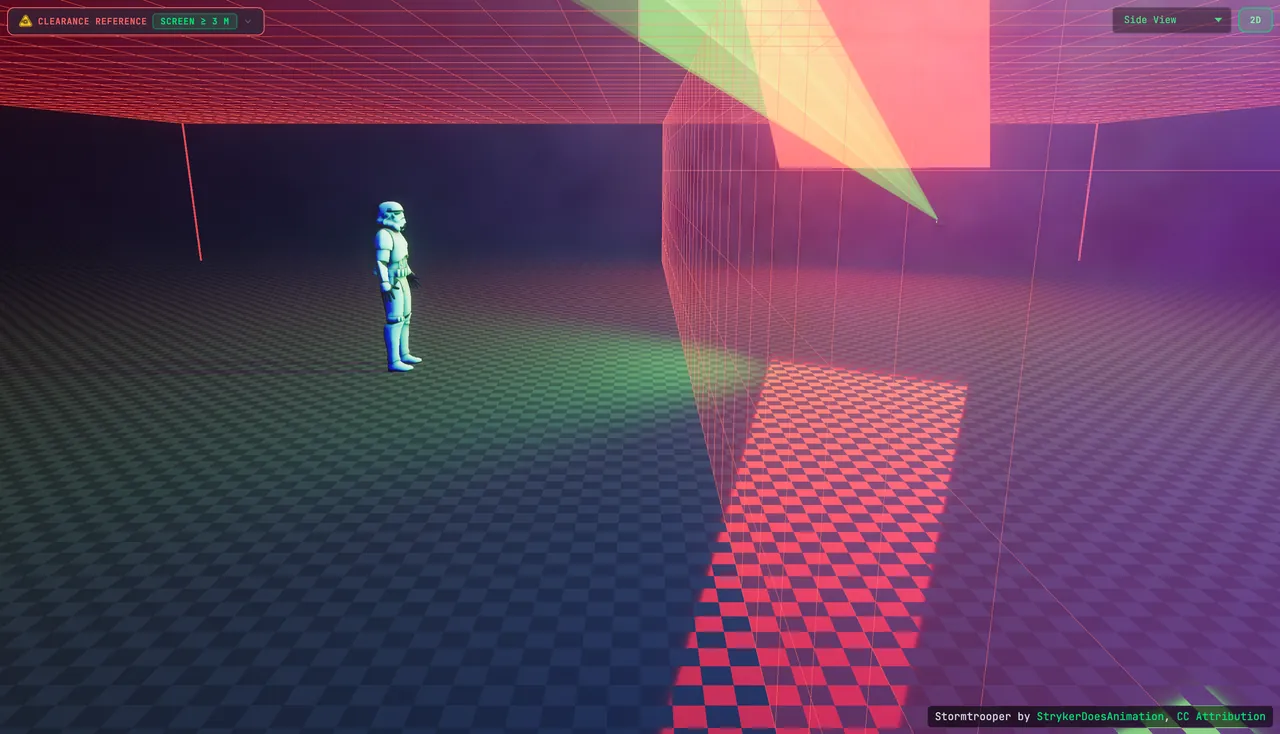
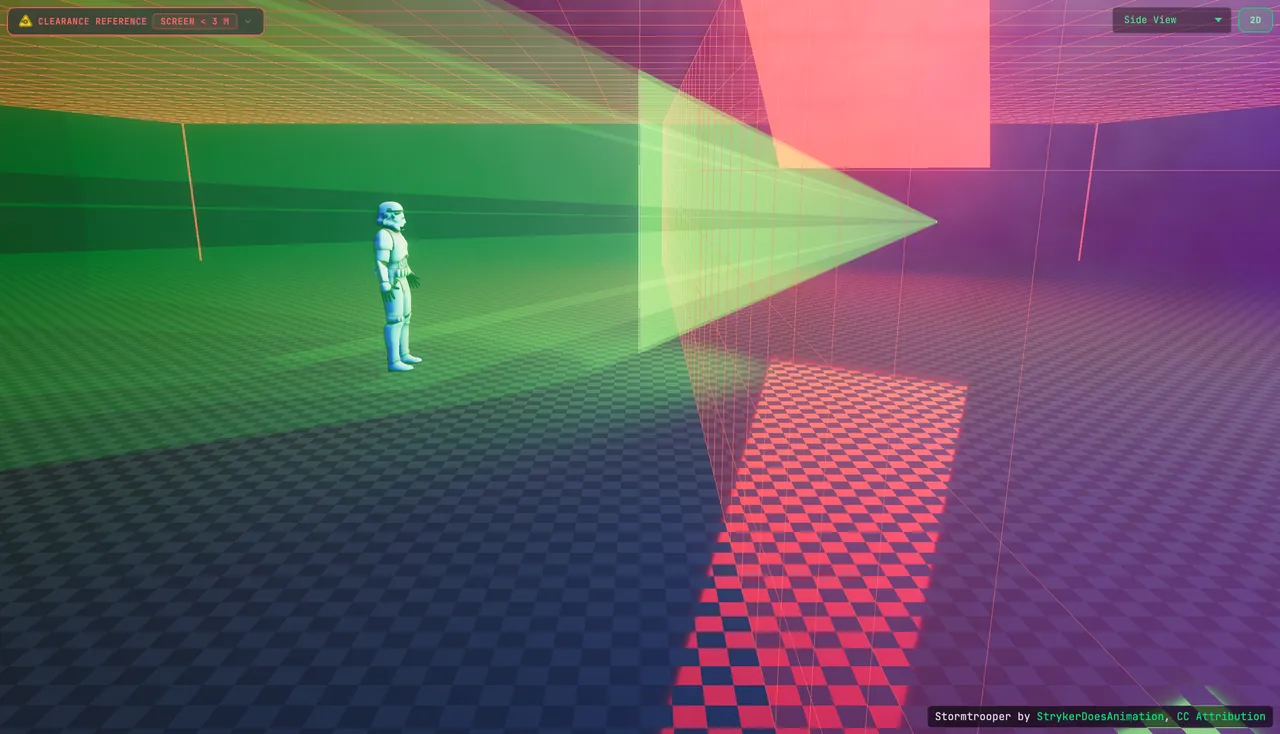 Screen < 3 mScreen ≥ 3 m
Show All Zones in the ILDA Viewer draws both references at once: the red grid at 3 m and the red walls 2.5 m out. On the left, the preview screen sits at 1.5 m and the beams cross the room at head height. On the right, the screen is raised until its bottom edge reaches 3 m, and the beams climb to it over the figure's head.
Audience scanning is not covered by a standard variance
Deliberately sweeping low-power beams across people requires a separate audience-scanning variance and a projector specifically certified for it, with tightly controlled irradiance limits. The FDA has revoked variances for unauthorized audience scanning. Do not improvise this.
What not to do. The preview screen is off, so nothing stops the beams, and the whole dolphin frame lands on the figure's face and chest. At show power, this is audience scanning, which needs its own variance and certified hardware. The preview shows where the beams go; it does not measure exposure.
Where is a laser beam allowed to end?
Every beam must end on a surface that completely stops it. In practice:
- Indoors: terminate on a wall, drape, or dedicated beam block — and mask content so beams don't overspill screens or targets.
- Outdoors: no beam may pass through, or reflect off, a termination surface into airspace. Avoid trees you can see sky through (wind moves the leaves) and building windows that could redirect a beam.
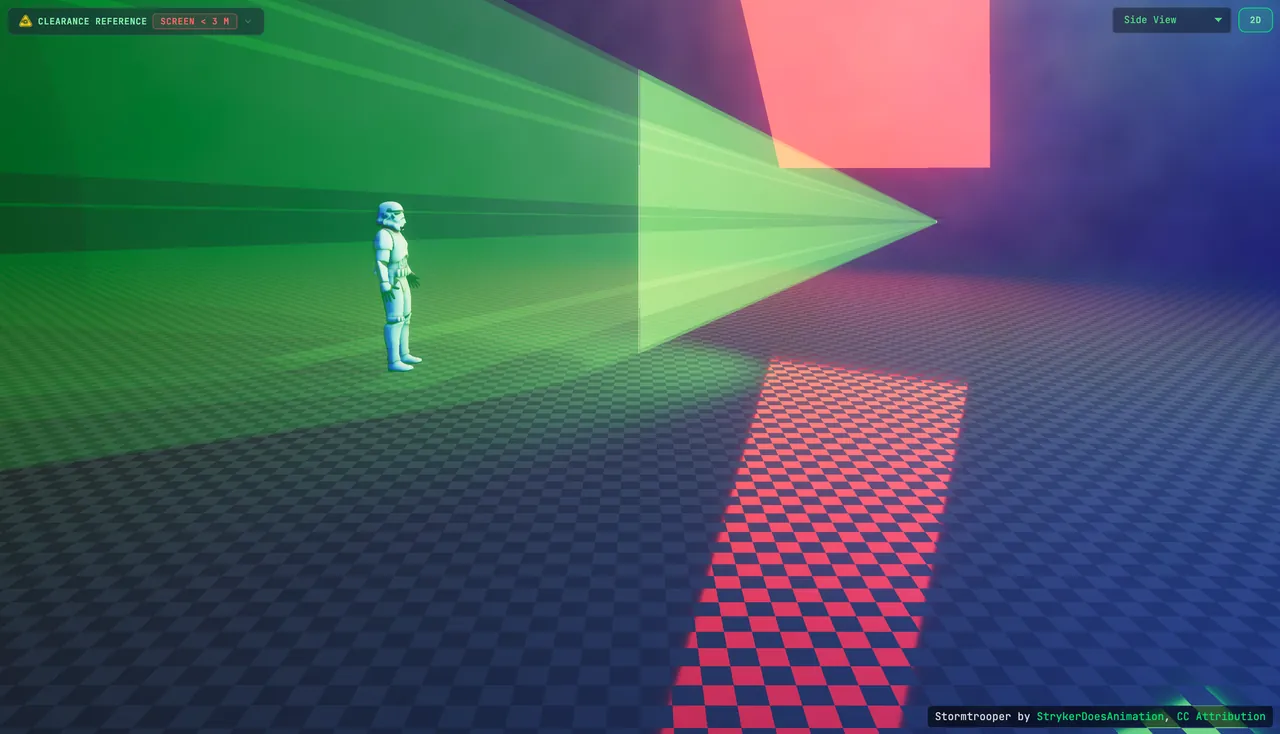
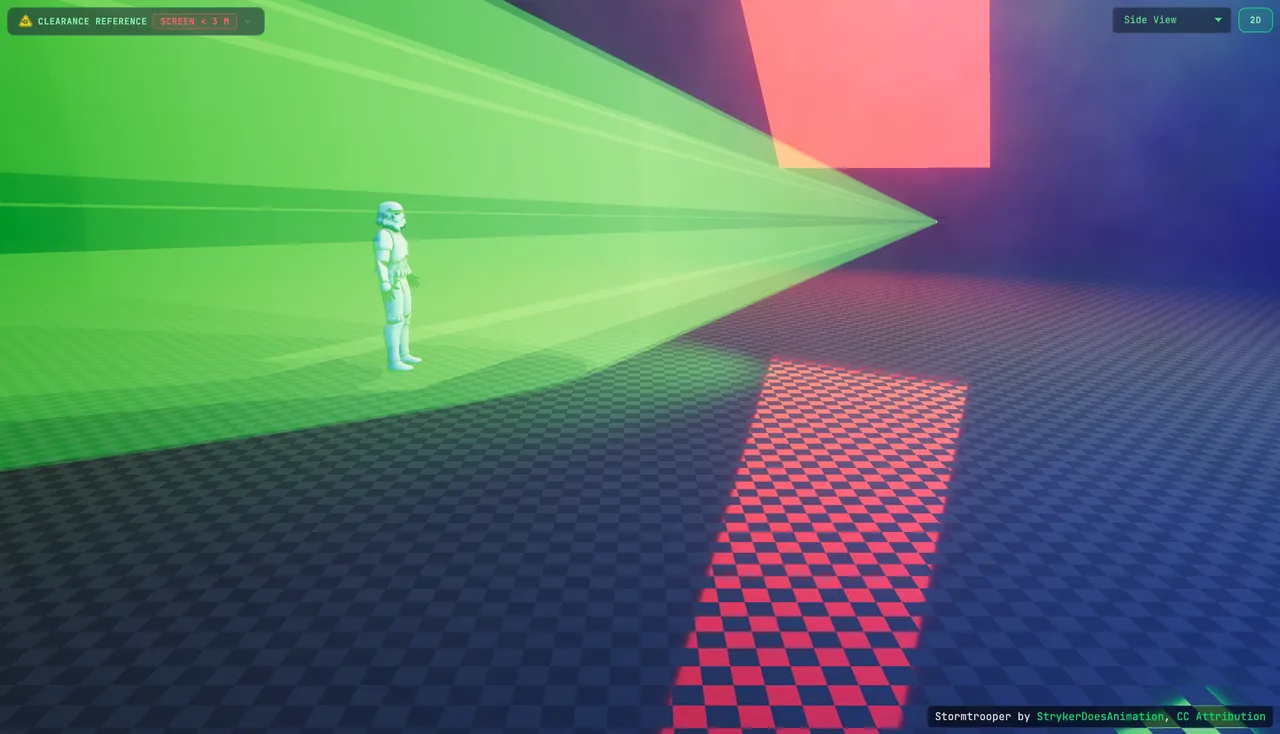 Screen OFFScreen ON
Look closely at the Screen ON frame: the preview still draws a faint continuation past the screen. That is the honest picture of a projection surface that lets some light through. If you can see light through it, it is not your beam stop. End every beam on a wall, a drape or a dedicated beam block.
How do I stop a laser show in an emergency?
A common myth is that "two independent stop methods" is a single FDA rule. It isn't — but multiple means to stop emission are effectively required by the combination of:
- Hardware features in 21 CFR 1040.10 — a key-operated control and a beam attenuator/shutter on Class IIIb/IV products.
- Variance conditions — the operator must be able to terminate emission instantly on any unsafe condition, and any effect that relies on scanning to stay safe must include a scan-fail safeguard that senses scanner motion and cuts output before limits are exceeded.
Treat an accessible physical E-stop plus a working scan-fail device as mandatory in practice. A good scan-fail reacts in around a millisecond.
Software stops sit on top of that hardware, never in place of it. In the ILDA Viewer's LASER OUTPUT panel, BLACKOUT blanks everything BeamTracer sends, and the button is never disabled.
When the output settles into a dot that is not moving, BeamTracer fades the laser out after about 1.5 seconds and shows Beam blanked: output not moving.
That guard only sees the frames BeamTracer sends. It cannot see a galvo that has failed inside the projector, so it is not a scan-fail safeguard. The projector's own scan-fail and your E-stop are what cut emission there.
Do I need a Laser Safety Officer?
Yes. Under ANSI Z136.1-2022, a designated LSO is required wherever Class 3B or Class 4 lasers are used. The LSO evaluates hazards (MPE, the Nominal Hazard Zone), verifies separation distances, ensures operators are trained, and has the authority to shut an unsafe show down. FDA variance conditions also point to ANSI Z136.1 as the consensus safety standard, and ANSI Z136.6 covers outdoor use.
What does the FAA require for an outdoor laser show?
The moment a beam can reach navigable airspace, the FAA is involved. Outdoor operators file a Notice of Proposed Outdoor Laser Operation (FAA Form 7140-1) under Advisory Circular AC 70-1B, typically ≥30 days ahead, and must get a letter of non-objection.
Aiming a laser at an aircraft is a federal crime
18 U.S.C. §39A: civil penalties, fines, and up to 5 years in prison. Pilots reported nearly 13,000 laser strikes to the FAA in 2024, per the FAA's own published laser-strike counts. Never let a beam touch the sky near flight paths.
What do I do if someone is exposed to a beam?
- Stop everything — blank or kill all output immediately.
- Get eyes checked — anyone who may have taken a beam to the eye needs a prompt ophthalmologic exam. A camera or phone sensor damaged by your beam is a red flag that power/exposure was unsafe.
- Report it — manufacturers must report accidental human exposure to the FDA CDRH via the Accidental Radiation Occurrence (ARO) report, Form FDA 3649. To report an unsafe show, contact the operator, the venue, the FDA CDRH, and your state laser agency.
What should I check before every laser show?
Run this before every show:
- Projectors securely mounted and aimed
- Projectors correctly connected to control
- Beam paths checked against audience areas in the 3D Beam Viewer
- Physical beam blocks installed where needed
- Every beam terminates on a safe surface
- 3.0 m vertical and 2.5 m lateral separation verified
- Projectors respond correctly to control inputs
- Operator has a clear view of every beam path and termination point
- Operator is trained and holds (or works under) a current variance
- A copy of the active variance is on site
- At least two ways to cut all emission (E-stop + scan-fail) tested
- Warning signage posted where required
- Wavelength-rated safety eyewear available for setup/testing
What laser safety glasses do I need?
Most accidental exposures happen during setup and testing, not the show — when people are near the projector with the cover off. Anyone in the beam path should wear safety glasses rated for your laser's wavelengths (typically red ~638 nm, green ~520 nm, blue ~445 nm). Look for an adequate optical density (OD) across those bands:
- RGB laser safety glasses (OD-rated) — broadband coverage for red/green/blue
One pair does not cover every laser
Match the eyewear's wavelength range and optical density to your specific projector. Goggles rated for one wavelength can be effectively clear at another, which is worse than no goggles at all — you will look straight at a beam you think you're protected from.
How can I preview audience clearance before the show?
The free ILDA Viewer lets you arrange a simulated venue and compare positions against clearance references. The preview does not measure exposure, certify a show, or establish safe clearance at a real venue:
| Tool | What it does |
|---|---|
| 3m Ceiling | Displays the 3.0 m reference plane in the preview |
| 2.5m Separation | Shows a lateral separation reference in the preview |
| Show All Zones | Turns every reference overlay on at once |
| 3D Beam Viewer | Previews your beams in a venue with a human figure for scale |
| Raise preview screen | Raises the projection screen in the 3D preview; it does not change your laser content or output |
| Height and distance rulers | Measure beam height above the floor and horizontal distance in the preview |
The 3.0 m clearance grid is the red plane overhead. Place a human figure where your audience would stand to compare positions in the preview. This visual reference does not measure exposure or account for every occupied surface in a real venue.
The Clearance reference badge reports the preview screen's bottom edge: Screen < 3 m or Screen ≥ 3 m. When it is below the reference, Raise preview screen moves the simulated screen upward:
On the right, the preview screen has moved upward and the Screen Height row reads At least 3 m. Only the preview position changes; the action does not filter beam paths, edit your ILDA file, or change hardware output. Raising the preview screen does not establish safe audience clearance in a real venue.
Use these preview references to illustrate your intended venue arrangement for an LSO review. They are planning aids, not a substitute for physical inspection or the requirements of your show.
To set up the Orbit Mode clip at the top of this guide:
- Open the ILDA Viewer in Chrome or Edge.
- Click DOLPHIN under TEST SUITE, or drop your own
.ildfile on CLICK OR DRAG ILDA FILE HERE. - Click 3D, then choose Orbit Mode from the camera menu.
- In PROPERTIES, open SCENE and set BEAM MODE to Cinema — Premium fog.
- Open Clearance reference and switch on Show All Zones, Human Figure and Dance.
- Click Raise preview screen to see the same beams with the screen's bottom edge at 3 m.
The ILDA Viewer, its TEST SUITE files, the Clearance reference panel and the DAC Simulator are free. Cinema — Premium fog is a Studio beam mode: on other plans you can still preview it with a watermark over the canvas, and Dance appears only in Cinema. Connecting a real projector is a Studio feature.
Load the DOLPHIN test file and switch on the clearance zones — free, in your browser, no install
OPEN THE ILDA VIEWER →Keep reading: the Laser Safety reference and Laser Clearance Reference in the docs, or our guide to choosing your first laser projector.