
Which App Should I Start With?
Not sure which BeamTracer tool to use? This page helps you choose based on your goal.
BeamTracer has three app families: Audio Visualizers, OSC-1, and BT Laser Studio. Studio is the video-production workspace within Audio Visualizers. Choose from these four starting points.
Prefer to watch? Trina walks through the four starting points in under three minutes.
Want the full tour first? This two-minute overview covers all three apps and ends exactly where this page begins.
The Onboarding Flow
The first time you click Try Free, a short questionnaire asks what you want to make, your experience level, what hardware you have, and where you heard about BeamTracer — then launches you into the best-matching app, opened in the right mode for your experience level, with a guided tour of the interface. When you later sign up, onboarding also suggests a plan (never a requirement — you can continue on Free).
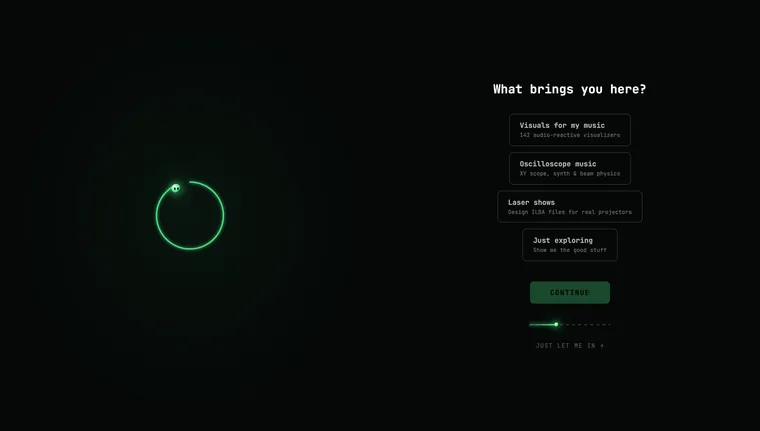
To take (or retake) the questionnaire: open beamtracer.com/welcome anytime — four quick questions, and it drops you into the right tool. The last one, Where did you hear about us?, is a single dropdown; choose Other to type a short note, or click Skip this question to go straight on without losing your other answers. It's also linked from the FAQ on the home page.
Reading for you: the last screen, You're all set., lists blog posts picked from your answers, each with a thumbnail. Choose oscilloscope music and you get every oscilloscope post, choose laser shows and you get every laser post; beginner guides come first when you're new, and techniques first when you pick Pro. Just exploring gets a short tour across all three apps. Click posts picked for you ↓ to jump to the list. Posts open in a new tab, so Jump in → is still there when you come back.
To replay the startup hints later: open Settings → SHORTCUTS (or press Ctrl+/, Cmd+/ on Mac) and click "Show startup hints again" — it restarts that app's first-run tour. Adding ?welcome=1 to the app's URL does the same thing.
By Goal
"I want to create laser show content"
→ Start with BT Laser Studio
Convert bitmap images, SVGs, logos, text, and video into ILDA files. Build animated sequences with keyframes and audio reactivity. Preview in 3D. Export to any hardware DAC.
"I want to visualize the music I'm playing or producing"
→ Start with Audio Visualizers
140+ real-time visualizers react to your audio. Connect a MIDI controller, set up a scene sequence, and record 4K video.
"I want to make a branded music video for a track"
→ Start with Studio
Load a track, stack visualizers with your cover art, text, and synced lyrics, then render a platform-ready file for YouTube, Reels, TikTok, or Spotify Canvas.
"I want to play oscilloscope music or XY synthesis"
→ Start with OSC-1 Oscilloscope
Load curated oscilloscope music tracks, play them through the built-in synth, apply beam effects, and output to a laser DAC or record video.
By Background
Laser Artist
BT Laser Studio is your primary tool. Start with Getting Started with BT Laser Studio → then Image to Laser to import your existing artwork.
If you want real-time laser output from audio, also check out OSC-1's laser DAC integration.
Musician / Producer
If you make oscilloscope music (stereo XY compositions), start with OSC-1. It plays back XY audio files and streams to hardware laser DACs.
If you want to make audio-reactive laser content from your productions, BT Laser Studio → Animation Studio bakes audio reactivity into ILDA files — no computer needed at the show.
For making YouTube visualizers, Audio Visualizers lets you drop in any audio file and record.
For a finished branded video, start with Studio.
VJ / Streamer
Audio Visualizers has the fastest time-to-visual. Open it, pick any visualizer, play audio — done.
For performing live: check out Perform Mode with MIDI controller integration.
For streaming: the built-in video export or fullscreen + OBS capture are your options.
Apps at a Glance
| BT Laser Studio | OSC-1 Oscilloscope | Audio Visualizers | Studio | |
|---|---|---|---|---|
| Primary output | ILDA files | Real-time XY + ILDA | Video + fullscreen | Branded video file |
| Best for | Laser content creation | Oscilloscope music | Visual content creation | Music videos from a track |
| MIDI support | No | Yes (Web MIDI) | Yes (APC Mini MK2) | No |
| Hardware output | DAC via ILDA files | Helios / Ether Dream live | None | None |
| Audio reactive | Pre-baked | Real-time | Real-time | Real-time (visualizer layers) |
| Video export | Yes — synchronized projection reference | Yes — loaded-track render + live recording | Yes — loaded-track render | Yes — frame-accurate, in the browser |
How do I turn the tool tips back on?
Open Settings → DISPLAY → TIPS in any BeamTracer app. Turn on Show tips, or select REPLAY TIPS, then close Settings. The guided cards restart from the beginning and link to deeper guides. Read Startup tips for skipping tips and replaying another tool’s tour.