
UI Modes
The three OSC-1 modes — Oscilloscope, Creator, and Performance — what each adds, and who each is for.
OSC-1 has three progressive UI modes. Start in Oscilloscope mode and unlock more tools as your workflow demands them.
Switching Modes
Press 1, 2, or 3 on your keyboard, or click the mode buttons in the top toolbar.
On a phone, the SCOPE, CREATOR and PERFORM buttons in the mode row under the transport do the same. See OSC-1 on a Phone.
The header shows a fourth tab, Export — it's not a mode. Clicking it opens the Export modal (video, WAV, ILDA, SVG, 3D→XY) on top of whatever mode you're in.
Mode 1 — Oscilloscope
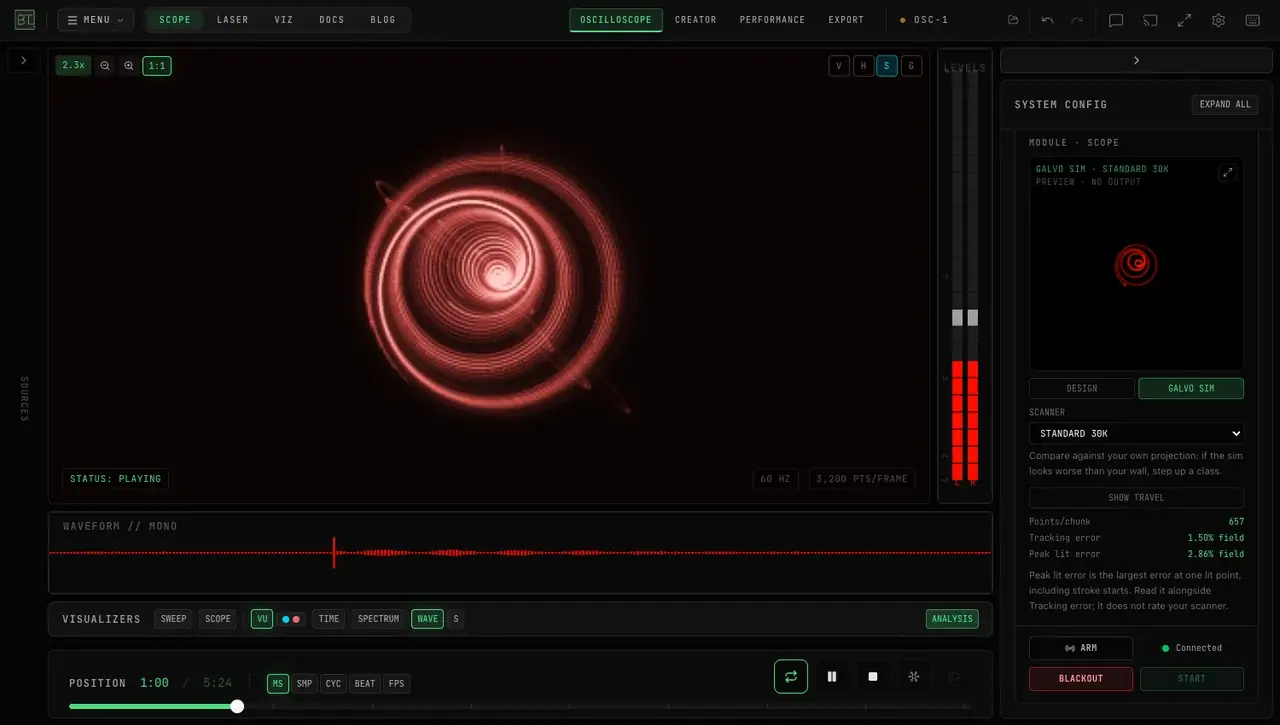
The default mode. Everything you need to play and enjoy oscilloscope music.
What's available:
- XY oscilloscope display
- Track library playback
- File import (WAV, FLAC, MP3)
- Live microphone / audio interface input
- 8 scope presets
- 15 XY beam effects
- The visualizer strip (sweep, VU, time, spectrum, and waveform monitors)
- Scope monitor (mini XY overview)
- The Export modal (video, WAV, ILDA, SVG, 3D→XY)
Who it's for: Oscilloscope music listeners, casual users, and anyone who wants to explore the genre without setting up a full performance rig.
Mode 2 — Creator
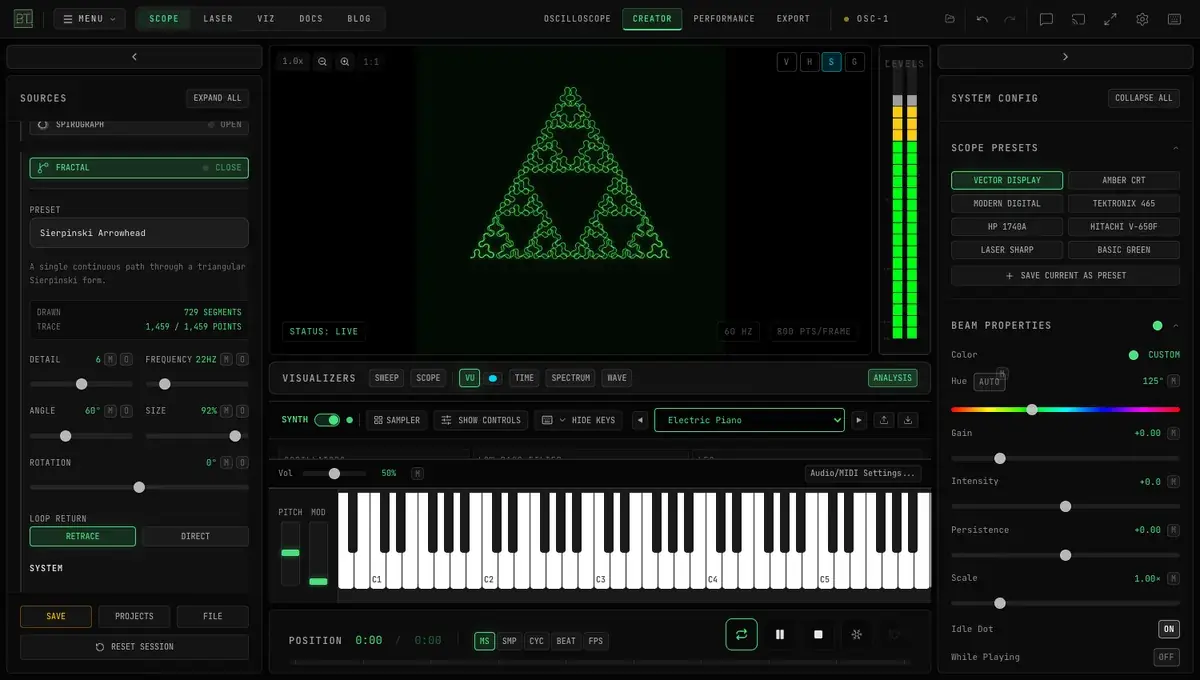
Adds generation and composition tools on top of Oscilloscope mode.
What Mode 2 adds:
- Signal Generators — Oscillator, Lissajous, Spirograph, Fractal, and Expression generators
- Shape Tools — Morph Sequencer, Shape Synth, 3D Import, SVG/Icon shapes, Tektronix 4051 retro vector library
- Text Tools — words on the beam in 1500+ Google Fonts, Hershey single-stroke faces or Handwriting, with Write, Tracer and Glitch animations
- Video Source — Webcam or screen capture → edge detection → XY vector output
- Viktor NV-1 Synthesizer — Full 3-oscillator subtractive synth with ADSR, LFO, and 50+ presets
- Virtual Keyboard — Polyphonic QWERTY keyboard for live synth performance
- Audio → Beam Modulator — Audio-reactive modulation of beam parameters
- Beam Transformer — Scale, rotate, and offset the XY display independently of the audio
Tier: The Audio → Beam Modulator (Advanced Modulation) is a Pro feature — every account gets 5 free modulation sessions to try it. See Pricing.
Who it's for: Musicians, composers, and visual artists who want to create original XY content rather than just play back existing tracks.
Mode 3 — Performance
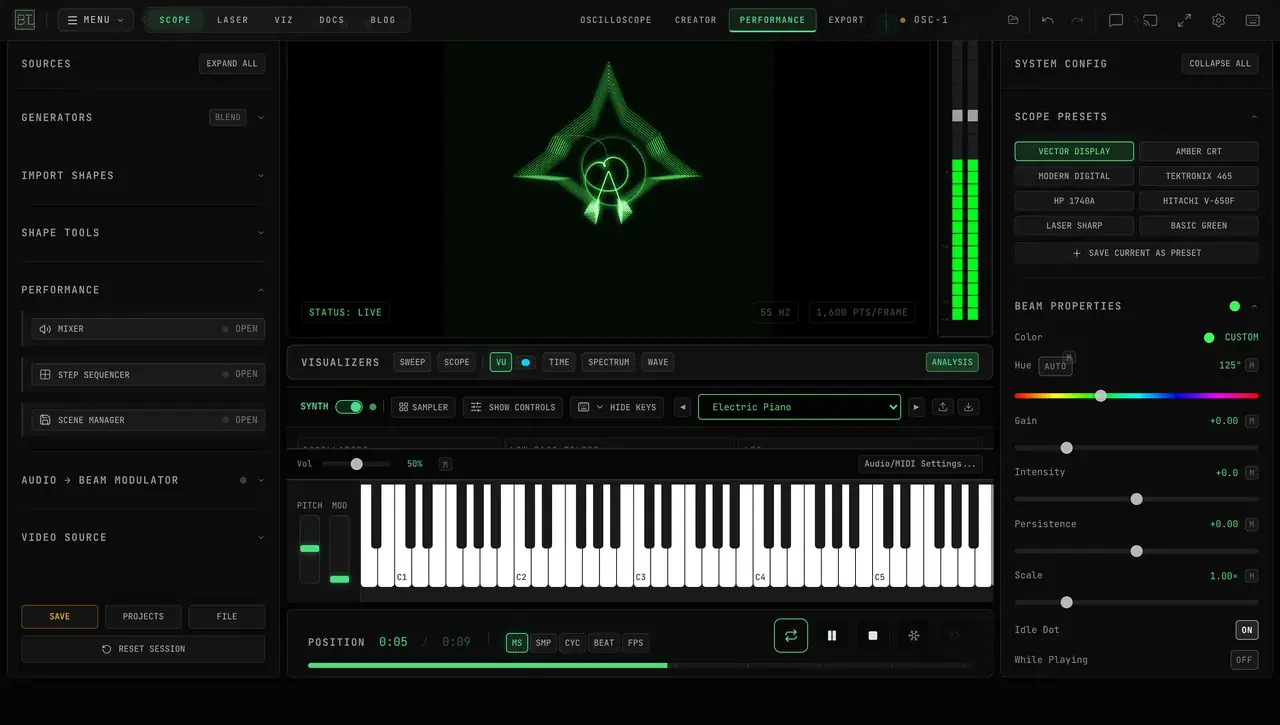
Adds professional live performance tools on top of Creator mode.
What Mode 3 adds:
- Mixer — a dynamic XY layer stack with blend modes and per-layer gain
- Step Sequencer — Shape step sequencer with internal or MIDI clock
- Scene Manager — Save and recall parameter snapshots with crossfade transitions (2 banks × 8 slots)
- Shape Sampler — 16-slot pad-triggered shape library with full APC Mini MK2 LED integration
Who it's for: Live performers, VJs, and laser show operators who need to sequence, mix, and recall XY content in real-time during a performance.
Feature Availability by Mode
| Feature | Mode 1 | Mode 2 | Mode 3 |
|---|---|---|---|
| Track Library | Yes | Yes | Yes |
| Scope Presets | Yes | Yes | Yes |
| Beam Effects (15) | Yes | Yes | Yes |
| Viktor NV-1 Synth | Yes | Yes | |
| Signal Generators | Yes | Yes | |
| Shape Tools | Yes | Yes | |
| Text Tools | Yes | Yes | |
| Video Source | Yes | Yes | |
| Audio → Beam Modulator | Yes | Yes | |
| Mixer (Layer Stack) | Yes | ||
| Step Sequencer | Yes | ||
| Scene Manager | Yes | ||
| Shape Sampler | Yes |
Visualizer Strip
The strip along the bottom of the display hosts toggleable monitor visualizers: SWEEP, SCOPE, VU, TIME, SPECTRUM, and WAVE (SPECTRUM and WAVE each have an S sub-toggle for stereo display).
TIME shows a loaded track's waveform with the playhead in the middle; drag it to scrub. With a live source — the oscillator, the synth, a microphone or tab audio — there is no track, so TIME reads LIVE // WAVEFORM and rolls the incoming signal right to left instead, the last five seconds with LEFT on top and RIGHT below. FREEZE holds it.
The spectrum strip shows frequency axis labels (100 Hz, 1 kHz, 10 kHz at their log-scale positions, per channel in stereo). Toggle them with the S button in the display's top-right corner, next to the V/H cursor and G graticule toggles.
The ANALYSIS | PERFORMANCE switch at the right end of the strip picks the mode, and both sides stay visible so you can see the other choice. ANALYSIS (lit green) runs the visualizers; PERFORMANCE (lit amber) turns them off to save CPU and GPU, and the strip collapses to one line with the same switch to bring them back.
XY Scope controls: a Time slider (0.5 ms to 500 ms across each panel); Layout — STACKED (a panel per channel) or OVERLAY (both traces on one panel, so the phase between them reads at a glance); then CH1 LEFT / CH2 RIGHT, each with a color dot you click to pick its trace color (cyan and coral by default), an on/off toggle, a Gain slider (0.1–5x) and an Offset slider (−50 to +50 px). Scroll the mouse wheel over the SCOPE panels to zoom the time too; each panel shows its current window beside LEFT / RIGHT, for example 10 ms.
SCOPE shows the LEFT and RIGHT channels as two traces and triggers them for you: each redraw starts on a rising edge of whichever channel carries the signal, and both traces start at that same instant, so a steady tone holds still and the phase between the channels reads true. With AUTO on, the traces are sized and centered to the signal. MEAS in the panel header adds each channel's frequency, peak and RMS level, and how far RIGHT lags LEFT in degrees — the number a Lissajous figure is made of: the Oscillator's CIRCLE preset reads R lags L 90.0°, ELLIPSE 45°. It also draws an amplitude histogram along each panel's right edge, showing how long the signal spends at each level: a sine piles up at its peaks, a square wave at its two levels, noise in a bell.
VU color presets: L/R, LASER, PHOS, RED, AMBER, CYAN, WHITE — plus AUTO when dynamic visualizer color is enabled.
Sweep trigger: set in Settings (⌘K) → VISUALIZERS → XY SWEEP — a Trigger Level slider (−100% to +100%) with RISING / FALLING edge buttons, plus the SPECTRAL and CUSTOM pitch-lock modes. Every setting is covered on the Triggering page.
Explain Controls
The ? button in the header (beside the Settings gear) turns on Explain controls. Point at any button, slider or toggle and it is outlined, with a card naming it and saying what it does. Press Esc or click ? again to finish. It needs a mouse, so it is not shown on phones.
Canvas Menu
Right-click the XY display for its menu:
- Reset View (
Home) and Undo Last Edit (Ctrl/Cmd+Z) - Show Graticule / Hide Graticule (
G) and Show Cursors / Hide Cursors - Freeze Display / Resume Display (
Ctrl/Cmd+Shift+P) — the same freeze as the transport's snowflake button - Export Frame (PNG) — saves the frame on screen as an image; a Background Opacity below 100% stays transparent in the file. Free-plan images carry the BeamTracer watermark, like every free export
- Export Frame (Print) — the same frame as black ink on white paper: the trace prints black, its glow gray and the screen white, for write-ups and handouts where a black page would waste ink
- Export Frame (ILDA) — opens EXPORT on its ILDA tab
- Copy to Clipboard — the same image as Export Frame (PNG), ready to paste
Graticule and Measurement Cursors
The buttons in the XY display's top-right corner:
- G (or
g) cycles the graticule: off, green, dark. It is a 10 × 8 grid laid exactly over the trace's square, labeled −5 to +5 across and −4 to +4 up, so a figure can be sized and centered against it. - V (or
v) shows two vertical cursors, V1 and V2; H (orh) shows two horizontal cursors, H1 and H2. Drag a cursor by its tab. - R (or
r) shows the MEASUREMENTS readout. V1 X and V2 X give each vertical cursor's position in grid divisions from the center, and ΔX the distance between them; H1 Y, H2 Y and ΔY do the same up and down. On the XY display X is the left channel's level and Y the right channel's — neither axis is time — so the readout measures position, not time or frequency.
Beam Transformer
The Beam Transformer widget (right Properties panel) manipulates the XY display independently of the audio:
- FREEZE — freezes the display (shows FROZEN while active) while the audio plays on. It holds every trace at once: the XY display, SWEEP, SCOPE, SPECTRUM and WAVE; the VU meter keeps metering. The transport bar has a matching snowflake button, plus a frame-step button beside it that advances the frozen display exactly one frame per click — step through an oscilloscope-music drawing frame by frame. Both work with every source, microphone and oscillator included
- GONIO — the goniometer view for stereo metering, on every preset: mono (L = R) stands vertical, pure side signal lies flat, and the width of the figure shows how wide the stereo is
- POLAR — switches to polar vectorscope mode, with a Polar Rotation slider (0–360°)
- SWAP, INV X, INV Y — swap or invert the channels. A connected laser follows them, so the projection turns and mirrors with the screen. The inverts act on the incoming channels before the swap, so with SWAP on, INV X flips the picture top to bottom
- LR / MS — switch between Left/Right and Mid/Side channel modes
- View Angle — 0–360° with 0°/45°/90°/180°/270° preset buttons
- Scale (0.1–2x unified), plus per-axis Scale X / Scale Y and Off X / Off Y offsets
- STEREO meters overlay and a RESET button
Triggering
Three trigger systems stabilize the display — every setting is covered in detail on the Triggering page:
XY Trigger — locks the main XY display to a threshold crossing: Channel (X / Y / MID), Slope (RISING / FALLING / ANY), Threshold (−100 to +100%), Holdoff, and Hysteresis. Settings (⌘K) → TRIGGER.
Audio Trigger — triggers time-domain views on amplitude events: ZERO or LEVEL mode, Slope, Level, Holdoff, and Hysteresis. Settings (⌘K) → TRIGGER.
Sweep Trigger — the XY Sweep's trigger: classic LEVEL edge triggering, or FFT-based SPECTRAL / CUSTOM modes that phase-lock the sweep to the detected (or chosen) pitch with a live Hz + note readout. Settings (⌘K) → VISUALIZERS → XY Sweep.