
Scope Presets
The 8 OSC-1 scope presets — phosphor color, bloom, afterglow, and what makes each unique.
OSC-1's eight scope presets simulate different real-world oscilloscope displays. Each one has a distinct phosphor color, bloom/glow behavior, and afterglow decay time.
Choosing a Preset
Click any preset in the Scope Presets section at the top of the right-hand Properties panel. The display updates immediately without interrupting the audio. You can also switch presets from a MIDI controller with Program Change: program 0 selects the first button — see Program Change. The tuning sliders live in Beam Properties, Beam Physics, Signal, and Beam Bloom / Glow below the preset buttons.
The 8 Presets
Every tile is the same 3:4 Lissajous figure from the Generators panel, turned slowly by the ROTATE beam effect so persistence shows — hover a tile to watch.
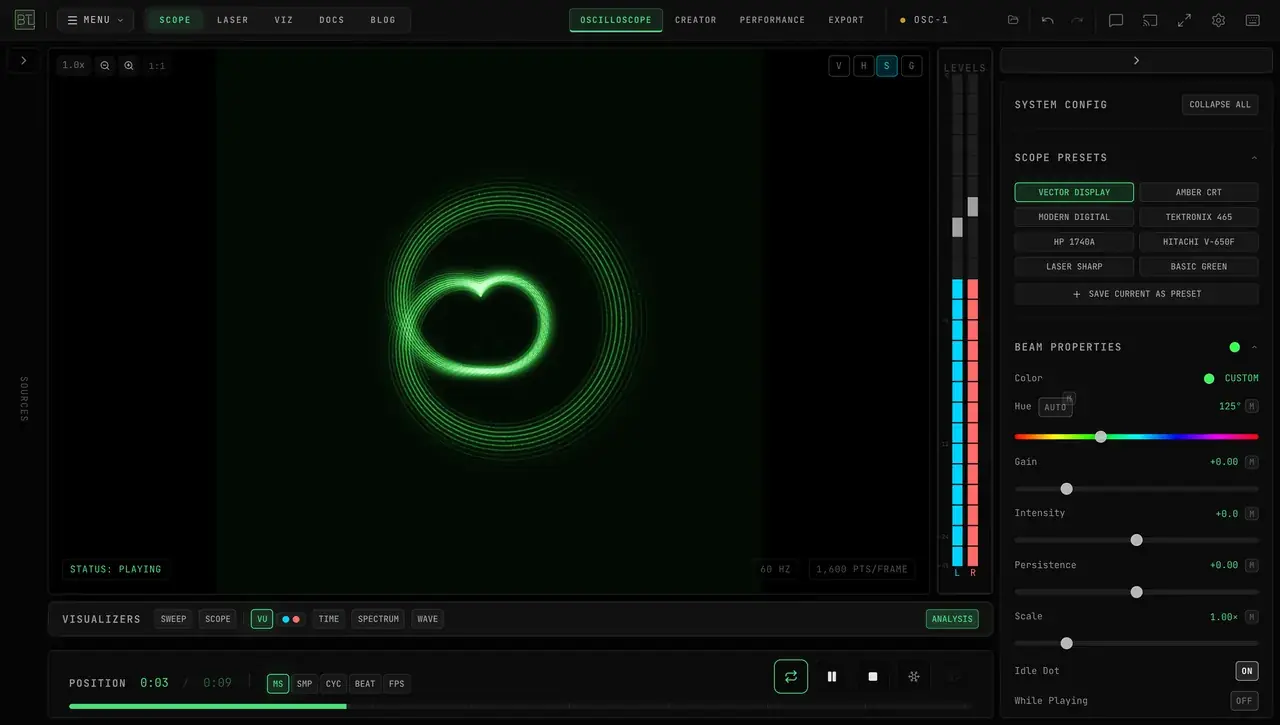
Vector Display
A clean, high-contrast beam inspired by vector arcade displays. Use it when you want maximum clarity without a warm phosphor tint.
- Phosphor: Configurable (default: bright green)
- Afterglow: Short trails that fade from frame to frame
- Glow: Built into the look (the Beam Bloom / Glow section does not apply)
- Separate shapes: Faint travel between discontinuous strokes is hidden automatically
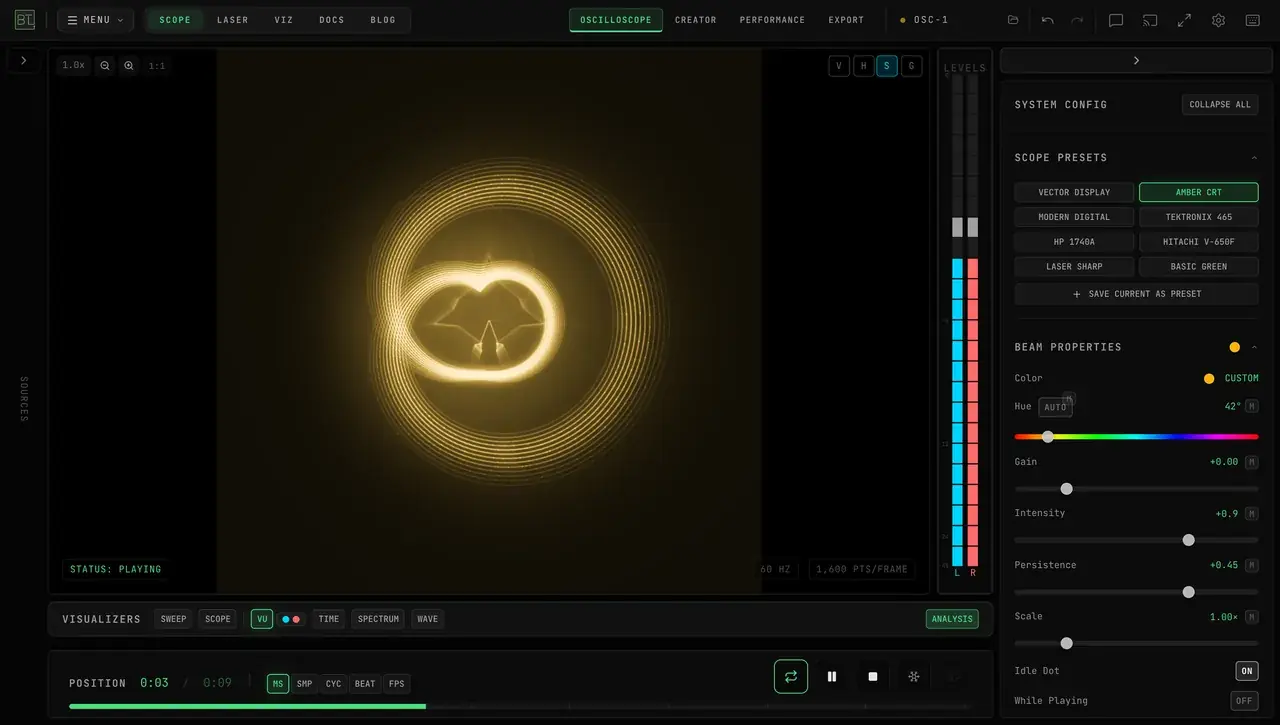
Amber CRT
The warm amber display of vintage terminals, with long afterglow and rich glow. It is particularly effective with slow, evolving content.
- Phosphor: Amber (hue 42°)
- Afterglow: Long trails that fade from frame to frame
- Glow: Strong, built into the look (the Beam Bloom / Glow section does not apply)
- Separate shapes: Faint travel between discontinuous strokes is hidden automatically
Modern Digital
Clean digital oscilloscope look with a green-teal beam and no bloom. A good balance of warmth and crispness.
- Phosphor: Yellow-green teal
- Afterglow: Short: the older part of each pass is slightly dimmer
- Bloom: Off
Tektronix 465
The reference look for the oscilloscope music community. Classic P31 green phosphor with medium afterglow. The Tektronix 465 is the most-used hardware oscilloscope in oscilloscope music history — this preset replicates its distinctive appearance.
- Phosphor: P31 green
- Afterglow: Medium: the older part of each pass fades
- Bloom: Off
HP 1740A
Hewlett-Packard's dual-trace classic with a blue-tinted green phosphor. A slightly cooler complement to the Tektronix. Known for crisp, bright display.
- Phosphor: Blue-tinted green
- Afterglow: Medium-short: the older part of each pass fades
- Bloom: Off
Hitachi V-650F
Long-persistence storage scope look, with the strongest afterglow of the classic presets: the older part of each pass fades most slowly. It does not leave trails from one frame to the next; for trails, use Vector Display or Amber CRT.
- Phosphor: Bright green, near white where the beam is densest
- Afterglow: Longest of the classic presets, within each pass
- Bloom: Off
Laser Sharp
Optimized for monitoring content intended for laser DAC output. Clean, thin beam with minimal bloom and high contrast — shows exactly what the laser path will look like on hardware.
- Phosphor: Adjustable (matches your laser color)
- Afterglow: Minimal
- Bloom: Tight, restrained halo
Use Laser Sharp when monitoring content for a real laser projector. Its beam stays crisp with minimal afterglow and a restrained display halo; the more atmospheric presets add stronger bloom and decay.
Basic Green
The simplest, most performance-friendly preset: a clean green beam with no bloom or afterglow. Use it if the more atmospheric presets run slowly on your hardware.
- Phosphor: Green
- Afterglow: None
- Bloom: Off
Customizing the Beam
Preset tuning happens in the sections below Scope Presets in the right Properties panel. Some controls appear only when they apply to the active preset.
Beam Properties
- Color presets — BASIC GREEN, AMBER, CYAN, ELECTRIC, MAGENTA, WHITE
- Hue — 0–360°, with an AUTO button that enables Rainbow mode (auto-cycling hue)
- Width — beam thickness, 1–6 px when available
- Gain / Intensity / Persistence — signal level, brightness, and trail length; the active preset determines which controls appear
- Scale — coordinate zoom, 0.25×–4× (Vector Display and Amber CRT; MIDI-mappable). On Amber CRT, zoom lives here — Gain controls beam brightness
- Idle Dot — ON/OFF (default ON): shows the parked electron-beam dot when the signal is silent, plus the leading beam-head dot on slow draws. It changes the screen only: a connected laser never holds an idle dot, whatever this is set to — see When the signal stops. When ON, three more controls appear:
- While Playing — ON/OFF (default OFF): off keeps the dot idle-only, so it never pops up during quiet passages mid-track; on also shows the dot during playback (the classic oscilloscope-music look)
- Dot Size — 0.4×–5×
- Dot Glow — 0–400%
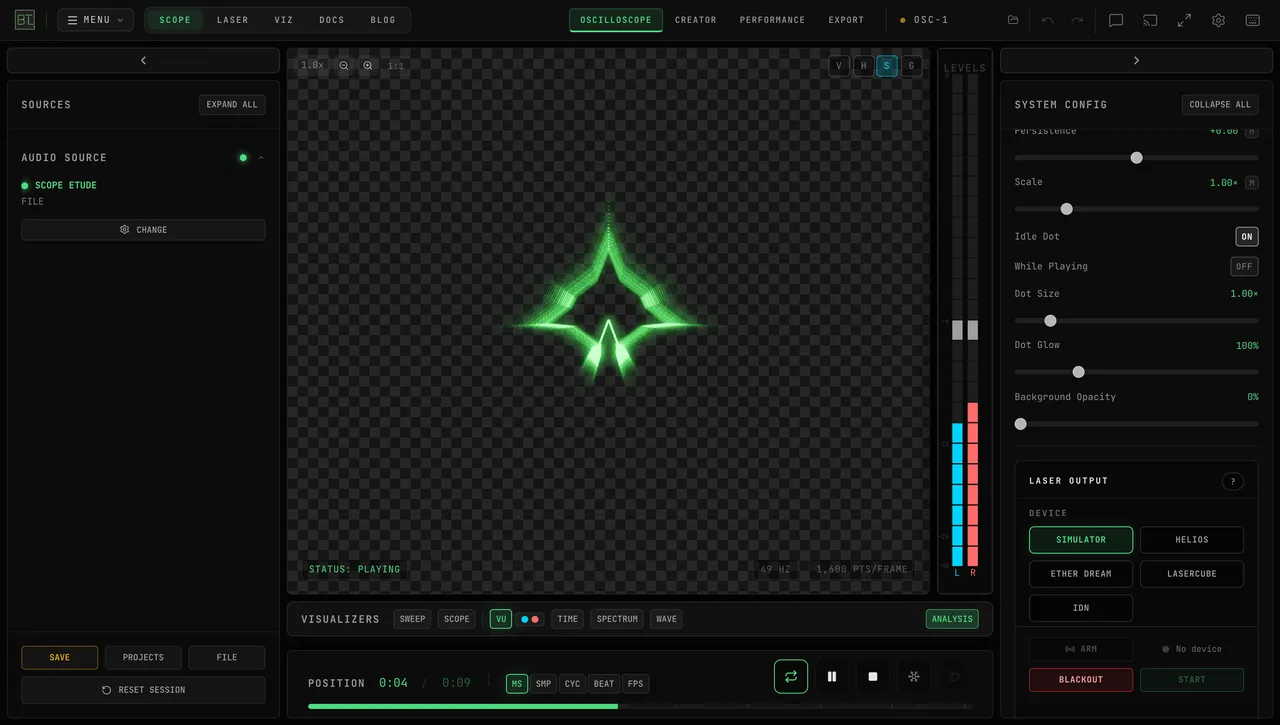
- Background Opacity — 0–100% (default 100%). The trace and its glow stay; the black screen, the Vector Display and Amber CRT tube face, and the graticule fade with it. At 0% a checkerboard shows through the transparent screen. Record a transparent WebM with EXPORT → VIDEO → RECORD LIVE INPUT — see Export.
Beam Physics
Shown for the presets that use them (not Vector Display or Amber CRT):
- Sharpness, Afterglow, Amber Shift, and Noise/Grain — each 0–100%
Signal
Every preset, collapsed until you open it — how the audio becomes the points the beam draws:
- 4x Upsampling (on by default) — adds intermediate points for a smoother-looking trace; Interpolation chooses the shape between samples
- Auto Gain — OFF, RMS, PEAK, or HOLD
Interpolation modes
- DOTS — displays the sample points as individual dots.
- LIN — connects samples with straight lines for a clean, angular look.
- STEP — holds each value until the next sample, creating a staircase look.
- LANC (default) — draws the smoothest curves and most closely resembles a hardware scope.
The four tiles show a 2 kHz circle from the Oscillator generator — only about 24 samples per revolution, so the reconstruction is visible. The difference is easiest to see with 44.1/48 kHz audio. High-sample-rate oscilloscope music is already dense enough that the modes look more similar.
Beam Bloom / Glow
Bloom stays off on Modern Digital, Tektronix 465, HP 1740A and Hitachi V-650F because it flickers with those looks, and this section is hidden while you use them, including after you adjust their sliders. Vector Display and Amber CRT draw their own glow and Basic Green has none, so the section is hidden for them too.
- ON/OFF — toggle bloom entirely
- Blur — bloom blur iterations, 1x–10x (higher = wider halo, more GPU load)
- Threshold — 0–1, luminance level where bloom starts
- Intensity — 0–2, bloom strength
Customizations, including Background Opacity, are saved with your session, and the beam dot preferences (Idle Dot, While Playing, Dot Size, Dot Glow) follow your account when you're signed in — like your other synced settings, they come with you across devices. To keep a full look permanently, click SAVE CURRENT AS PRESET in the Scope Presets widget — saved user presets appear alongside the 8 factory presets.
Beam Effects
All 15 real-time XY beam effects in OSC-1 — what each does visually and tips for combining them.
Shape Tools
Creator Mode shape tools — Drawing, Morph Sequencer, Shape Synth, Shape Morph with multi-copy phase cutting, 3D Import, SVG/Icons with image tracing, Lottie animations, and the Tektronix 4051 retro vector library.