
Viktor NV-1 Synthesizer
The OSC-1 built-in synthesizer — 3 oscillators, dual ADSR, LFO, delay, reverb, 50+ presets, MIDI Learn, and modulation matrix.
Viktor NV-1 is OSC-1's built-in subtractive synthesizer, designed specifically for generating oscilloscope-music-style XY audio. Its controls are approachable enough to learn quickly and deep enough for serious synthesis.
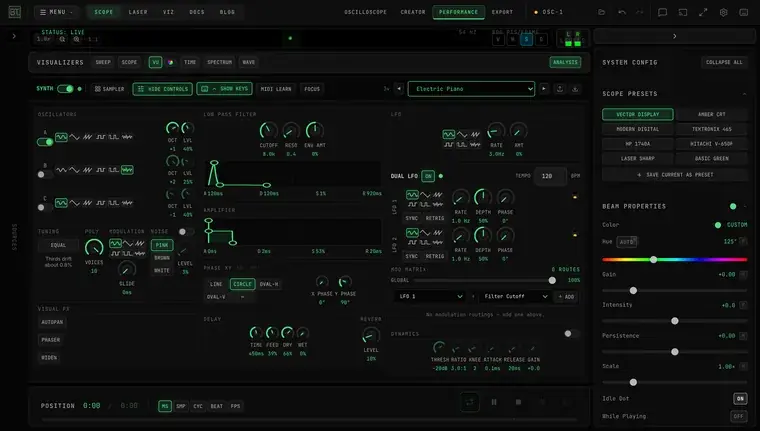
Every module is visible at once — the rack is a fixed three-column grid (sound sources, filter/amplifier/phase/time effects, modulation/dynamics) that fits alongside the side panels with no scrolling or tab-switching. Hide the on-screen keys (Cmd/Ctrl+Shift+K) to see the full rack with the XY display above it.
Overview
Viktor NV-1 is a 3-oscillator subtractive synthesizer with:
- 3 oscillators (Sine, Triangle, Sawtooth, Square, Pulse, Noise)
- Dual ADSR envelopes (Amplitude + Filter)
- Two assignable LFOs plus a preset LFO, routed via the Mod Matrix
- Filter (Low-pass with resonance)
- Dedicated Noise source (pink / brown / white)
- Delay and Reverb effects, plus stereo Visual FX (Autopan, Phaser, Widen)
- Onboard Compressor
- Polyphony (1–10 voices) and Glide
- 50+ built-in presets in 9 categories
- Full MIDI Learn support (the M button next to each control)
- Modulation matrix (7 sources, 21 destinations)
Oscillators
Each of the three oscillators (OSC A / B / C) has:
- Waveform selector — Sine, Triangle, Sawtooth, Square, Pulse, Noise
- OCT — octave from -2 to +2 relative to base pitch
- LVL — independent volume level
There are no semitone or detune knobs — pitch offsets between oscillators are created with the octave knobs or by modulating Osc Pitch destinations in the Mod Matrix.
For clean Lissajous figures: use two sine oscillators and keep frequency ratios simple — set one oscillator an octave apart with the OCT knob, or play intervals with small integer ratios (octaves, fifths). Complex ratios produce unstable, drifting figures.
Envelopes (ADSR)
Each envelope is an interactive curve editor — an A/D/S/R contour you shape by dragging its handles directly:
- Attack handle (peak) — drag horizontally to set attack time
- Decay/Sustain handle (elbow) — drag horizontally for decay time, vertically for sustain level
- Release handle (tail) — drag horizontally to set release time
The numeric readouts under the curve (A / D / S / R) are also draggable — drag one up or down for fine adjustment.
AMP envelope
The curve in the AMPLIFIER module controls the overall volume shape of each note: attack (time to peak), decay (peak to sustain), sustain (held level, 0–100%), release (fade after key release).
FILTER envelope
The curve in the LOW PASS FILTER module applies the same four parameters to the filter cutoff frequency. Enables classic attack-decay filter sweeps.
Filter
The LOW PASS FILTER module has three knobs above its envelope curve:
- CUTOFF — cutoff frequency above which harmonics are removed
- RESO — resonance, emphasis at the cutoff frequency (high values create a resonant peak)
- ENV AMT — envelope depth, how much the filter envelope modulates the cutoff
LFOs
Viktor NV-1 has three LFOs. None of them has a destination selector — all LFO routing happens in the Modulation Matrix, where each LFO appears as a source.
Preset LFO
The built-in LFO stored with each preset:
- Rate — 0.1 to 20 Hz
- AMT — modulation amount
- Waveform — 6 waveforms
LFO 1 / LFO 2
Two assignable LFOs with deeper controls:
- Rate — 0.01 to 50 Hz
- Depth, Phase, Sync, and Retrig
- Waveform — 6 waveforms including Sample & Hold
Effects Chain
Delay
- TIME — 10ms to 1s (or BPM-sync)
- FEED — echo repeat count
- DRY and WET — the mix, as two levels
Reverb
- A single LEVEL knob (0–100%) controls the reverb amount. Its room response loads when you initialize the synth; there are no size or damping controls.
Compressor
- Post-effects compressor for consistent output levels. Particularly useful when playing the synth through a laser DAC — prevents clipping from destroying the XY output.
Visual FX (Stereo Effects)
The VISUAL FX panel adds stereo movement — which on an XY display means visual movement:
- AUTOPAN — Rate (0.05–10 Hz) and Depth (0–100%)
- PHASER — Rate (0.05–8 Hz) and Feedback (0–95%)
- WIDEN — Width 0–2x (0 = mono, 1 = normal, 2 = maximum width)
Noise Source
A dedicated NOISE panel (separate from the oscillators' Noise waveform) with an on/off switch, a noise type selector — PINK, BROWN, or WHITE — and a LEVEL knob.
Polyphony & Glide
The POLY and MODULATION panels sit beside the noise source:
- VOICES — polyphony from 1 to 10 voices
- GLIDE — portamento time, 0 to 166 ms
- The MODULATION waveform selector sets the mod-wheel LFO shape
Tuning
The TUNING panel selects how notes are tuned, which on an oscilloscope is a visual setting as much as a musical one.
- EQUAL / JUST — equal temperament (the default, and what every other instrument you own uses) or just intonation.
- ROOT — which key the just intonation is pure in. Shown only when JUST is selected.
Why it is here. A figure sits still only when the frequency ratio between the two axes is an exact whole number. Equal temperament approximates every interval except the octave — a major third is off by about 0.8%, which is enough to make the image visibly rotate. Just intonation uses the exact ratios, so the figures close and the picture stops moving.
Try it on a major third: hold C and E in equal temperament and watch the figure turn, then switch to JUST with ROOT on C and it stops.
Switching tuning does not disturb notes already sounding; the change applies from the next note. Set ROOT to the key you are playing in — that is what makes just intonation sound better rather than worse.
Full explanation in Harmony.
Presets
50+ factory presets organized into nine categories:
| Category | Description |
|---|---|
| 80s Classics | Vintage synth staples |
| Visual | Presets tuned for oscilloscope visual quality |
| Bass | Low-frequency tones |
| Lead | Bright, punchy tones for melodic playing |
| Pad | Sustained evolving textures |
| Brass | Brassy stabs and swells |
| Keys | Keyboard and piano-style tones |
| FX | Noisy, chaotic presets for abstract visuals |
| Other | Everything else |
The preset list fills in when you press INITIALIZE in the synth bar; until then it reads Press INITIALIZE. Presets you save yourself appear in a User category. With the synth panel focused, the ←/→ arrow keys step to the previous/next preset.
Use the upload and download buttons beside the preset selector to move a synth patch between browsers or machines as a JSON file. A patch exported from OSC-1 can be imported directly later, including files created before the patch round-trip repair.
Show / Hide the Keyboard
The keyboard icon in the synth bar (or Cmd/Ctrl+Shift+K) collapses the on-screen piano to reclaim canvas for the visualization. This is purely visual — the synth keeps playing, so you can keep performing from your computer keyboard (QWERTY note-typing) or a MIDI controller with the keys tucked away. It's ideal when you don't have a MIDI keyboard but still want a bigger canvas while you play.
Switching the synth OFF with the ON/OFF toggle hides the keys automatically (there's nothing to play); turning it back on restores them. Your show/hide choice is remembered between sessions.
MIDI Learn
Click the MIDI LEARN button in the synth keyboard panel header to enter MIDI Learn mode — every MIDI-mappable knob, and each envelope stage readout, then shows a small M button next to it:
- Click an M button — it shows
...while listening - Move a knob or send a CC message from your controller
- The parameter is mapped — the button now shows the CC number
- Right-click the button to remove the mapping
Click MIDI LEARN again to leave the mode and hide the badges. START MIDI LEARN in Settings → MIDI shows the synth's badges too, for mapping several controls in a row.
Synth mappings are listed with every other OSC-1 mapping under Settings → MIDI → LEARNED MAPPINGS, where they can be removed, exported and imported — see Hardware Control.
Modulation Matrix
The modulation matrix routes modulation sources to synth parameters. All LFO routing happens here — the LFO panels themselves have no destination selectors.
Sources (7):
- LFO 1
- LFO 2
- Preset LFO
- Env Follower
- Velocity
- Mod Wheel
- Aftertouch
Destinations (21):
- Filter Cutoff, Filter Resonance
- Osc 1/2/3 Pitch and Osc 1/2/3 Level
- Noise Level
- Amp Attack, Amp Decay, Amp Release
- Delay Time, Delay Feedback, Delay Mix
- Reverb Mix
- Master Volume
- LFO1 Rate, LFO2 Rate
- Phase X, Phase Y
Tips for Oscilloscope Visuals
Avoid heavy distortion. Clipping destroys the clean XY path and creates messy, unstable visuals. Use the compressor to keep levels below 0dBFS.
Use sparse arrangements. Simple harmonics (2:3, 3:4, 4:5 ratios) create the cleanest Lissajous figures. Complex chords create interesting but harder to predict patterns.