
LaserCube Point Rate: What the 35K Limit Means
A Wicked Lasers LaserCube 7.5W Ultra Mk2 draws at most 35,000 points per second. On our bench a 60,000 pps request played at 35,000, a 5,000 pps request was ignored — the cube kept its previous rate — and 12,000 was accepted. In BeamTracer, keep the point rate between 12 and 35 kpps; the default, 30 kpps, already is.
Hi, I'm Trina with BeamTracer.com — this one is about the number on the box, what the cube actually does with the setting you pick, and how to see the effect on a file before you light anything.
General guidance, not legal or safety advice. Laser rules are specific to where and how you project. Verify current requirements with the FDA CDRH and your state laser agency before any public use, and read the laser show safety guide before the first beam leaves the lens.
Illustration of a compact cube-style laser projector drawing a pattern on a wall. The point rate is how many of those pattern points the cube can place each second.
The same 980-point frame in the ILDA Viewer's GALVO SIMULATION, slowed down. The two sides draw in the same 12 : 35 ratio as 12,000 and 35,000 pps. At the faster rate the beam gets round the whole frame almost three times in the time the slower one gets round once. Lines brightened for the web.
What is the LaserCube's maximum point rate?
35,000 points per second. X-Laser's product page for the LaserCube Ultra 7.5W Mk2 lists its scanners as "35K PPS @ 7º scan angle", and 35,000 is also the most our bench cube would play, whatever we asked for.
Read the angle as well as the number. Scanner speeds are commonly compared at about 8°, the condition ILDA describes for its standard test pattern, and a smaller angle is an easier move for the mirrors. A rating at 7° is a ceiling to stay under, not a speed to aim for. Understanding PPS and Scanner Ratings explains how test angles change what a rating means.
What happens if you set a LaserCube above 35,000 pps?
Nothing gets faster. The cube caps the rate at its own maximum: we selected a 60 kpps rate and the stream to the cube started at 35,000 pps. The frame still played, just at the cube's speed instead of the one on the setting.
That matters because a laser frame is a fixed number of points. The ILDA Viewer's STABILITY readout for the 980-point orientation pattern says 61 Hz with the device set to 60 kpps and 36 Hz at 35 kpps — how many times a second the whole frame is redrawn. On a LaserCube only the second number can happen, so plan for it: pick a rate the cube will really run, and judge your file at that rate.
What is the lowest point rate a LaserCube accepts?
On our bench, 12,000 pps was accepted and 5,000 pps was not. The low request was not refused with an error; the cube simply kept the rate it was already running. The floor sits somewhere between those two numbers, and we have not narrowed it further, so stay at 12,000 pps or above.
A rate that is too low fails silently
If you set a very low rate and the drawing looks exactly as it did before, the cube has most likely ignored the request and kept its previous rate. Set 12 kpps or more and it takes effect.
How does point rate change what a LaserCube draws?
For a finished file, point rate sets how often each frame can be redrawn. Divide the rate by the frame's point count: 980 points at 35,000 pps redraws about 36 times a second; the same 980 points at 12,000 pps, about 12 times. The fewer redraws a second, the more a frame flickers.
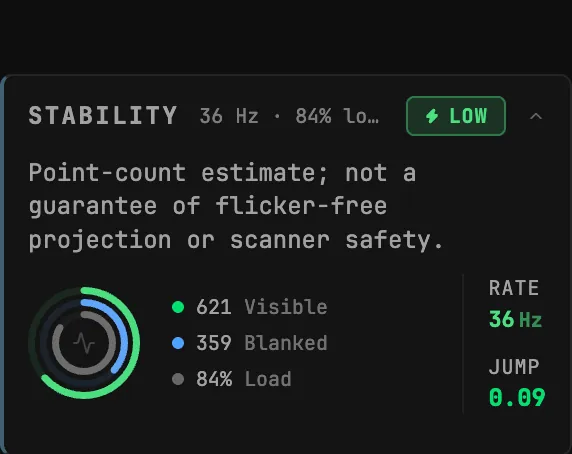
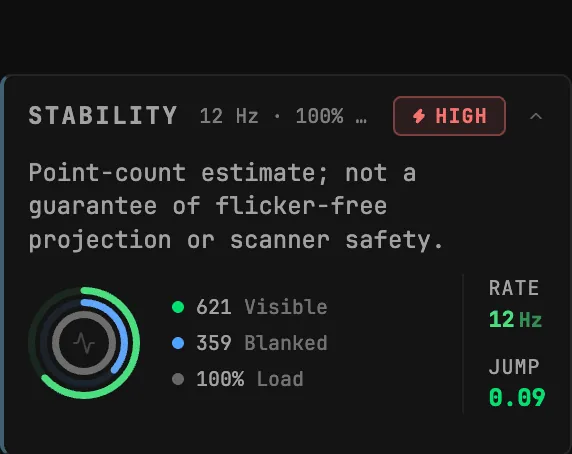 12 kpps35 kpps
FILE HEALTH in the ILDA Viewer does the division for you. Set Device to the rate you will run and it compares what the file needs against it.
Here the orientation pattern needs 29 kpps to redraw at 30 frames a second. At 12 kpps the panel turns to OVER LIMIT and says the heaviest frame fits about 12 FPS, and suggests simplifying the geometry, lowering the frame rate, or choosing a faster device.
At 35 kpps the same file reads Selected rate: 35 kpps against 29 required, with a NEAR LIMIT rather than OVER LIMIT: it fits the LaserCube's ceiling, without much room to spare.
How do I set the point rate for a LaserCube in BeamTracer?
Each laser tool sends at the rate you choose in that tool. In the ILDA Viewer that is Device under FILE HEALTH; in Text to Laser it is EXPORT RATE under ILDA OUTPUT. Both start at 30 kpps, which is inside the LaserCube's range, and both have a Custom choice for any other value.
- Open the ILDA Viewer in Chrome or Edge and drop your
.ildfile on CLICK OR DRAG ILDA FILE HERE. - In FILE HEALTH, leave Device on Standard 30k, or choose Custom and enter a value from 12 to 35 in CUSTOM MAX KPPS.
- Read Required against Selected rate; FILE HEALTH reports the redraws per second at that setting. For a frame-by-frame rating, click the Settings gear, open ADVANCED, switch on STABILITY, and expand it to see RATE.
- In PROPERTIES, open LASER OUTPUT, choose LASERCUBE and click CONNECT LASERCUBE.
- Click ARM, confirm, then START; the frames go to the cube at the rate you set.
- Click EXPORT ILDA to save a copy as ILDA Format 0, 1, 4 or 5 for other players.
An ILDA file does not store its point rate
The rate is a property of playback, not of the file. A file you export here plays at whatever rate the next player is set to, so set that player to 35 kpps or below for a LaserCube too.
Connecting the cube needs the BeamTracer Bridge and the cube in LAN client mode — the full walkthrough is LaserCube Setup with BeamTracer. Sending frames to real laser hardware is a Studio feature; every account gets 3 free output sessions to try it, and the PREVIEW device is free on every plan. See Pricing.
Can I check a file against 35,000 pps without a LaserCube?
Yes. FILE HEALTH and STABILITY (switched on under ADVANCED in the Viewer's settings) work on any file with no hardware connected, and they are free in the ILDA Viewer with no account. Set Device to Custom with 35 in CUSTOM MAX KPPS, and the panel tells you whether the file redraws fast enough at the LaserCube's ceiling. GALVO SIMULATION under ANALYSIS TOOLS shows the beam drawing it.
The rest of the output panel — Power limit, Frame rate, Galvo speed, Output scale and the ADVANCED calibration — works the same for every DAC and is documented on Laser DAC Output. Everything else we measured on the cube, including color thresholds and firmware, is on the LaserCube page.
Check your file against 35 kpps before it reaches the cube
OPEN THE ILDA VIEWER →Next: LaserCube Setup with BeamTracer if the cube is not connected yet, Understanding PPS for how scanner ratings are measured, and the Laser Show Safety Guide before any show.
That's point rate. beamtracer.com — I'll see you in the next one.