
Why Do Lines Connect Separate Shapes in Oscilloscope Drawings?
Lines can connect separate oscilloscope shapes because the XY signal must move from one stroke's end to the next stroke's start, then return when the drawing loops. In BeamTracer OSC-1, choose starting points that shorten those moves and inspect the exported stereo WAV. Stereo audio carries X and Y positions without a separate beam-off channel.
Press Play to hear the actual exported XY signal. MODERN DIGITAL makes the diagonal connecting segment visible. The triangles are steady; the audio repeatedly traces their outlines and the travel between them. Start with a low listening volume.
Hi, I'm Trina with BeamTracer.com. You can finish two separate triangles in the drawing editor and still see a line between them when you play their stereo audio. The signal has to get from one triangle to the other. Choosing where each stroke starts changes that journey.
Where does the connecting line come from?
An XY signal gives the display one position at a time: the left channel supplies X and the right channel supplies Y. After a stroke ends, the next stroke begins somewhere else. The change between those positions is travel. A looping drawing also needs a move from the final stroke back to the first.
In the example, the left triangle begins and ends at its top corner. The right triangle begins at its lower-left corner. Traveling between those positions adds a diagonal across the gap. Both triangles can be closed and still have that connecting segment.
For a closed triangle in LINES, tap the first corner again before pressing END STROKE. OSC-1 doesn't close an open shape automatically, and closing the outline still leaves travel to the next stroke.
Why can the drawing preview look cleaner than its WAV?
Keep the editable drawing and inspect the exported WAV as a separate result. The editable source retains its stroke boundaries. A stereo WAV holds two audio channels, so it cannot carry an independent brightness command for travel. Display style also changes how clearly you see a quick move between positions.
The native drawing source in VECTOR DISPLAY. This view does not establish what a stereo WAV will look like on another display.
In this demonstration, VECTOR DISPLAY draws clean-looking outlines while MODERN DIGITAL makes the exported WAV's connecting segment easy to inspect. Those are software display choices. A physical oscilloscope's response and intensity settings affect its result too.
Some physical scopes have a separate Z input for intensity. That requires another signal and a suitable connection; muting a stereo file doesn't supply it. The two-object lesson explains how one XY signal can draw several objects.
How do I reproduce the connecting line in OSC-1?
Draw two triangles as separate strokes in CREATOR → DRAWING, starting the first at its top corner and the second at its lower-left corner. Play the drawing, then export its audio as stereo WAV. Reopen that WAV and select MODERN DIGITAL to inspect the path carried by the file.
- Open OSC-1, select CREATOR, and open DRAWING.
- Select LINES and tap the left triangle's top, lower-right, lower-left and top corners.
- Press END STROKE and draw a separate right triangle from its lower-left corner, returning to that corner before ending the stroke.
- Press PLAY DRAWING and keep TRACE SPEED at the same setting for both comparisons.
- Press SAVE DRAWING to keep an editable
.beamtracer-drawingcopy. - Open EXPORT → AUDIO.
- Press EXPORT TRACK → WAV to save the stereo
.wavaudio.
To reopen the WAV, use AUDIO SOURCE → CHANGE, or the file drop zone when no source is loaded. Start playback, then select MODERN DIGITAL in SCOPE PRESETS. Keep the same framing and preset when comparing two exported versions.
How do I shorten travel without changing the artwork?
Choose a stroke's starting corner closer to the next stroke's starting point. For this pair of closed triangles, begin the left triangle at its lower-right corner. Keep the right triangle's start at its lower-left corner. The move across the gap becomes shorter and horizontal while both triangle outlines stay the same.
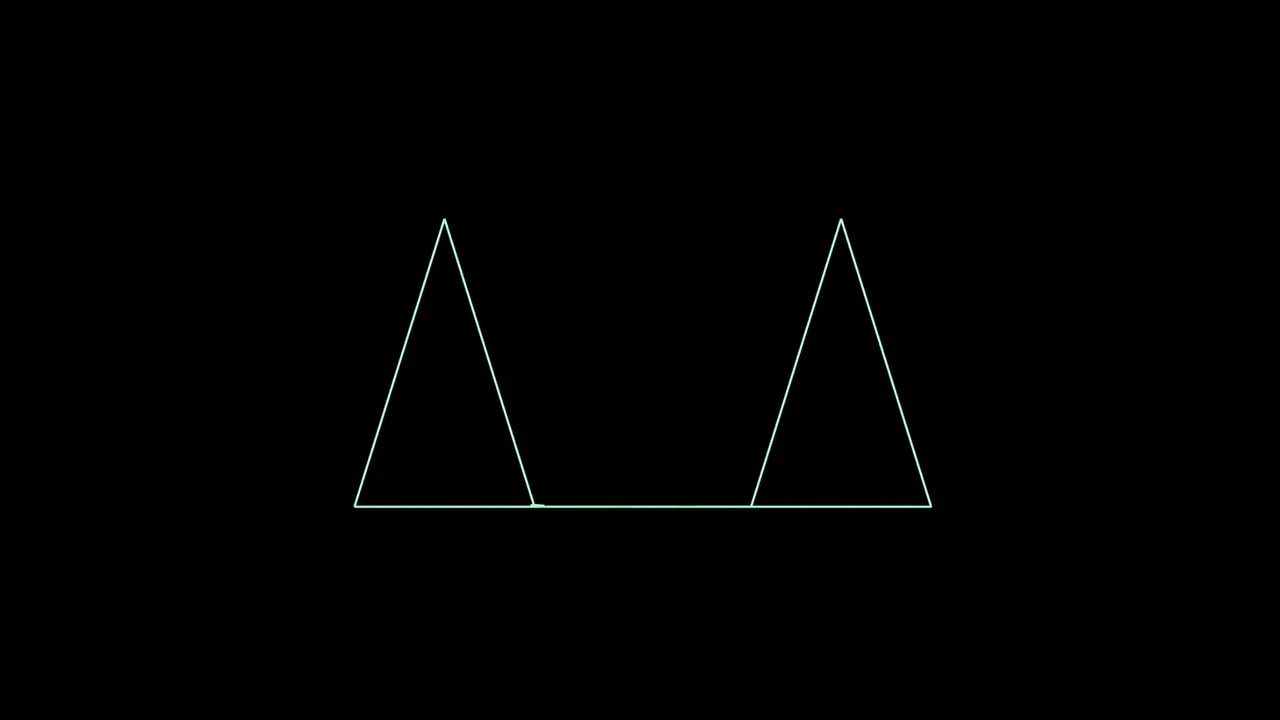
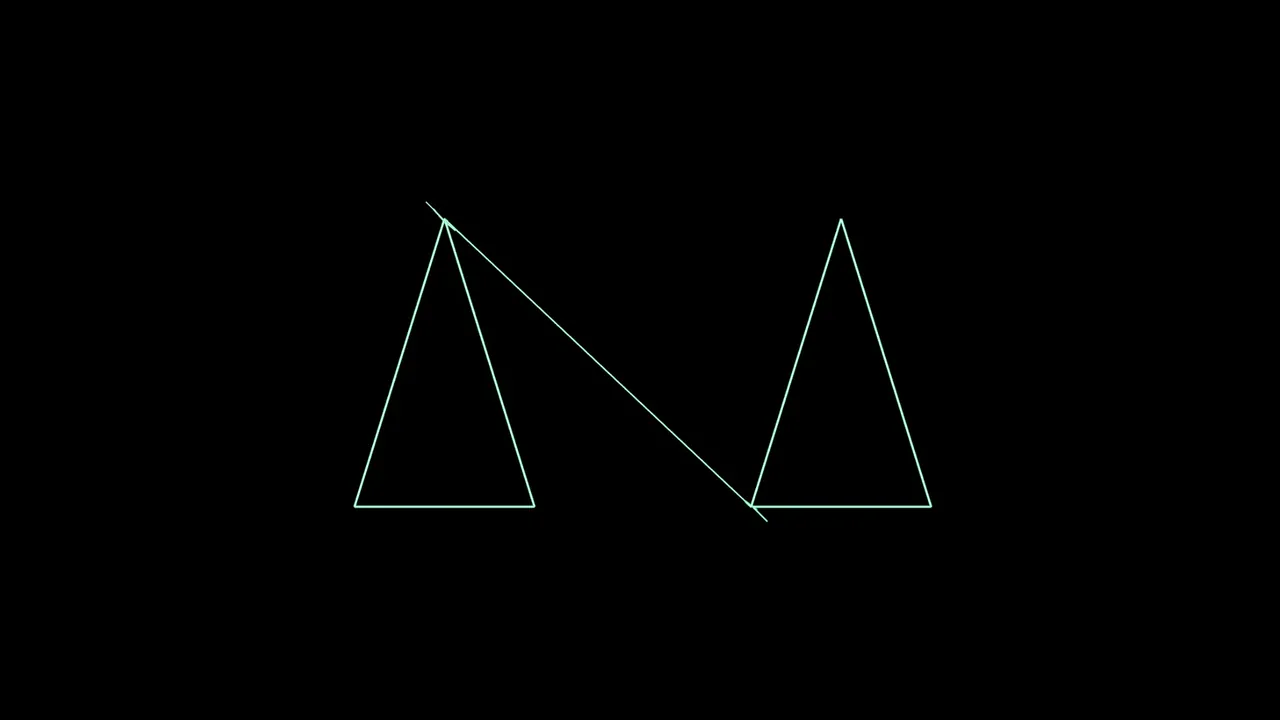 Top corner startInner corner start
Save the first drawing before experimenting. You can redraw a new version with the current LINES and END STROKE controls, then export and compare it. Inspect both the outgoing move and the loop return: shortening one move doesn't guarantee a clean cycle everywhere.
This can also change the sound. An XY drawing is an audio waveform, and choosing a different traversal changes the sequence of positions in that waveform. Listen to the exported version before deciding which drawing you want to keep.
Does faster travel make the line invisible?
Faster travel can make a connecting move less prominent on a display whose brightness follows how long the beam spends along a path. It does not add a beam-off channel to stereo audio. Whether the move remains visible depends on the waveform and display, so inspect the result instead of assuming a speed setting removes it.
Use TRACE SPEED to compare drawing speed in OSC-1, and keep that setting fixed while testing different starting corners. Changing speed and stroke traversal at once makes it harder to tell which caused the difference. The sample-rate lesson explains why trying to draw faster also affects available detail.
A display setting doesn't repair the audio path
Changing the scope's display style can make travel easier or harder to see. It leaves the WAV's X and Y coordinates in place. Keep the editable drawing so you can change the path itself when that is what you need.
How do I keep the drawing editable and share what I hear?
Use SAVE DRAWING for editable strokes and EXPORT → AUDIO → EXPORT TRACK → WAV for stereo XY audio. For a demonstration of the current playback and sound, use EXPORT → VIDEO → RECORD LIVE INPUT, then STOP RECORDING. That live recording is separate from authoring an offline rendered sequence.
The drawing-file walkthrough covers reopening editable artwork and saving projects. A video records one chosen display; its look does not establish how the WAV will appear on another scope.
Are oscilloscope travel lines the same as laser blanking problems?
ILDA laser points can mark travel as blanked. Ordinary stereo XY audio carries the two position channels without an independent color or beam-off field. Use the laser blanking guide when troubleshooting a projector, and inspect its actual output path separately.
A shorter travel path or a clean software picture does not certify a physical laser installation. For the drawing exercise, open OSC-1, save both versions, and compare the stereo files with the same display settings.