
Album Art Music Visualizer: Stop Retyping Your MP3 Tags
Your MP3 already carries the cover art, title, artist and album inside the file. Drop it into BeamTracer Studio with EMBEDDED ARTWORK, INFO & LYRICS switched on and those tags land on the canvas as editable layers, the artwork at full resolution — so there is no form to fill in and no second upload of a picture you already have.
Hi, I'm Trina with BeamTracer.com — this one's about the form you shouldn't have to fill in, and the tags in your MP3 that fill it for you.
Under two minutes: the tags land as layers, and nobody types anything. If you would rather read through it, here is the written version.
Open most music visualizer tools and you'll meet the same little form. A box for the song title. A box for the artist. An upload button for the cover art. And you fill it in, because that's what you do with a form — even though you typed all three of those before, and they are sitting inside the MP3 you just uploaded. The tool asked again because it never looked.
BeamTracer Studio looks.
What is actually inside your MP3?
A block of tags alongside the audio itself. On MP3 that's called ID3; FLAC, M4A and OGG all have their own version of the same idea. Any of them can hold the song title, the artist, the album, the credited album artist, the lyrics, and the cover image — the actual picture, not a link to one.
| Tag | What it holds |
|---|---|
| Title | The song name |
| Artist | The performing artist |
| Album artist | The credited artist for the release |
| Album | The release title |
| Picture | The cover art — the actual image, inside the file |
| Lyrics | The words, sometimes with timings attached |
Here is that block from the other side — one MP3 open in a tag editor, every field already filled in:
"Living in Analogy" by Craig Abaya, from Fashion Statement (2022), used with permission. The editor is Mp3tag — a tag editor for macOS and Windows, not affiliated with BeamTracer. Title, artist, album, album artist, composer and the cover art itself, all riding inside one 7.5 MB file. Nothing here had to be uploaded anywhere.
That picture row is the one people forget about. It isn't a thumbnail and it isn't a link to something. It's the artwork itself, embedded in the file at whatever size it got saved at. It's what your phone puts on the lock screen when the track comes on.
Which means it's already on your laptop. You just uploaded it. Twice, if you filled in the form.
How do you get your album art and title into a music visualizer?
Drop the tagged file into BeamTracer Studio with EMBEDDED ARTWORK, INFO & LYRICS on — it's a toggle in the AUDIO SOURCE panel, and it's on by default — and the frame builds itself. The title, artist and album arrive as text layers, the cover art as a full-resolution image layer, and any embedded lyrics as a lyrics layer.
- Open BeamTracer Studio and open AUDIO SOURCE on the TRACK step.
- Check that EMBEDDED ARTWORK, INFO & LYRICS is on — it is on by default.
- Click UPLOAD YOUR OWN and choose your tagged MP3, FLAC, M4A or OGG.
- Watch the title, artist, album and cover art land as their own layers in the left rail.
- Select any of those layers to type over the text, restyle it, or drag the artwork where you want it.
- Click 4 FRAME and pick YOUTUBE, INSTAGRAM, SHORTS · REELS · TIKTOK or SPOTIFY CANVAS.
- Click 5 EXPORT, then RENDER VIDEO, and save the finished MP4 (H.264) or WebM (VP9) at 1080p or 4K.
| In the file | On the canvas |
|---|---|
| Title | The title layer, already typed |
| Artist | The artist line underneath it |
| Album | An album line above the title |
| Cover art | An artwork layer, full resolution |
| Lyrics | A lyrics layer |
This is the whole argument in seven seconds. It starts on the placeholders —
ALBUM TITLE, SONG TITLE, ARTIST NAME — because nothing has been loaded
yet. Then the file lands and they're replaced by "BeamTracer Album", "Orbital
Blob" and "Beam Tracer", with the cover art arriving last. Nobody typed
anything, and there was nothing to fill in.
And they're all just layers once they land. Drag the artwork somewhere else, change the font, delete the album line if it's a single. The tags are a starting point, not a cage — if your artist tag says something you'd rather not put on screen (we've all got one), type over it.
Compilations and features
If the artist tag is empty, Studio falls back to album artist — which is usually the one that's actually filled in on a compilation or a track with a guest on it.
Can you try it without uploading your own music?
Yes — BeamTracer Studio ships a fully tagged sample track, so you can watch the tags build the canvas before you hand a website your unreleased single.
The sample track is called ORBITAL BLOB, and it's tagged on purpose — title, artist, album, album artist, genre, an embedded cover, and lyrics. Click ORBITAL BLOB in the AUDIO SOURCE panel and watch six layers land in the rail: four of them straight off the tags, plus a visualizer and a backdrop to sit them on.
It makes the point faster than any screenshot I could put here. Nobody typed anything.
What if your MP3 has no tags?
Studio falls back to the filename for a title and leaves the rest empty, and you type it in by hand. The result looks identical — genuinely, no difference. But you're better off fixing the file once, because that fix then follows the track everywhere.
Loads of files turn up completely bare. A bounce straight out of your DAW. A WAV back from mastering. An MP3 that lost its tags somewhere in a Dropbox round trip in 2019. Tag it once and you get:
- On your phone and in every player — correct art on the lock screen
- In your DAW's browser and your library
- In every future video you ever make from it
- On any platform that reads tags when you upload
Here's how, quickly:
| Tool | Platform | Notes |
|---|---|---|
| Music / iTunes → Get Info | macOS, Windows | Fine for one file; the artwork tab takes a drag-and-drop |
| MusicBrainz Picard | macOS, Windows, Linux | Free, does batches, looks the release up for you |
| Mp3tag | Windows, macOS | Free, batch, the standard answer for a whole album |
Embed the artwork at a sensible size
A 3000×3000 cover is correct for a release. It is also several megabytes riding around inside every single copy of that file, forever. For video work 1200×1200 is plenty, and it keeps the file light enough to drop into a browser tab without sitting there watching a progress bar.
Why don't other visualizer tools read your tags?
Because they're built around a template, and a template is a finished design with named holes in it — this is where the title goes, this is where the cover goes. The form you're filling in is the tool asking you to plug its holes. It isn't that they couldn't read the file; it's that the design was finished before your file existed.
BeamTracer Studio isn't template-shaped. It's a stack of layers on a canvas, so "make a title layer that says this" is something it can do at load time rather than a slot somebody had to plan for in advance. Reading your tags and building the layers is the exact same operation as you adding a layer yourself — which is why the imported ones stay completely editable afterwards. They're not special. They're just layers that arrived early.
And to be fair about it: if a template happens to be exactly the design you wanted, filling in three boxes is a tiny price and you'll be done in a minute. The form isn't the problem. The problem is that the form is mandatory when the answer was sitting in the file the entire time.
Can BeamTracer Studio read the lyrics out of the file too?
Yes, and they turn up at three different fidelities:
- Timed lyrics — some files carry the words with millisecond timestamps attached. Studio turns those straight into timed cues, and you've got a lyric video without ever touching a stopwatch.
- LRC text — the karaoke format, timestamps written inline. Read straight through as well.
- Plain text — just the words, no timings. These land as an untimed stack for you to place, because nothing in the file says when line four happens.
Number three is by far the most common, and the whole walkthrough for it — including UPLOAD LRC and DOWNLOAD LRC — is in the lyric video guide.
What does BeamTracer Studio read that template tools make you type?
All of it, and the difference is what happens afterwards: a tag that lands as a layer stays editable, while a tag typed into a template box stays where the template put it.
| Template tools | BeamTracer Studio | |
|---|---|---|
| Song title | You type it | Read from the file |
| Artist | You type it | Read from the file |
| Album | Usually not even offered | Read from the file |
| Cover art | A separate upload | Read from the file |
| Lyrics | Paste it, then time it by hand | Read from the file, timed if the file has timings |
| Afterwards | Fixed where the template put it | Every one an editable layer |
Next
- How to make a music visualizer from an MP3 — the whole workflow, start to export
- How to make a lyric video — what to do with that lyrics tag
- How to make a Spotify Canvas — 3 to 8 seconds, silent, and weirdly easy to get rejected
Drop in a tagged MP3 and watch the credits place themselves.
OPEN BEAMTRACER STUDIO →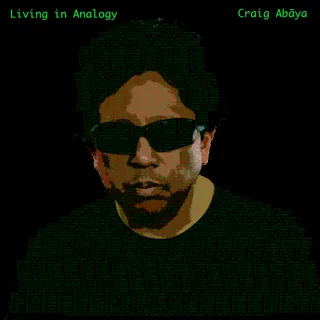
Special thanks to Craig Abaya for letting us use his music here. The tag editor screenshot on this page is his song, his artwork and his tags — a real released file rather than a spotless demo built to make the software look good.
Go listen to it properly: "Living in Analogy", from Fashion Statement (2022), featuring the additional performers credited on the release. Used with permission.